At a 400-guest gala, the organiser wants one thing that sounds simple: every guest should pay for their own drinks and extras. Guests picture a quick tap at the table. The operations team sees a bar queue, card readers struggling with weak signal, staff answering “is this charged to the host?”, and a finance query the next morning asking which payment belongs to which attendee.
That gap is why how to let guests pay for their own orders at events isn't a checkout question. It's a commercial and operational workflow covering contracts, service charges, guest communication, staffing, payment processing, refunds and reconciliation. The right model can remove awkward shared tabs. The wrong one just moves the queue from the till to the finance office.
Table of Contents
- Understanding Guest Self-Payment at Events
- Policy Decisions Every Venue Must Lock Down First
- Choosing the Right Guest Payment Model
- Setting Up the Technical Stack
- Designing a Guest Experience That Works Well
- Staffing, Fees and Service Charge Implications
- Reconciliation, Fallback Plans and a Pre-Event Checklist
Understanding Guest Self-Payment at Events
At a hotel reception, restaurant booking or stadium event, a guest may order one drink while the organiser covers the room hire and agreed catering. The guest expects a personal receipt and a clear payment request. The venue must still decide who owns the transaction, how staff identify the payer and where the amount appears in the final accounts.
That is why how to let guests pay for their own orders at events is an operational workflow, not a checkout button. It connects the event agreement, guest communication, ordering, payment processing, refunds, staffing and reconciliation. A QR code can start the process, but it cannot resolve a failed payment, an unclear service charge or an order mistakenly assigned to the host.
The payment environment supports individual ordering. Barclays reported that 94.6% of eligible in-store card transactions were contactless in 2024, while contactless transactions increased 3.7% across hospitality and leisure and 3.4% in bars, pubs and clubs. The UK hospitality payment data also shows cash accounted for around 12% of hospitality transactions in 2023. Cash remains relevant for accessibility and guest choice, even where contactless is the normal route.
What guests expect
A guest sees the menu, selects a drink, taps a card and receives a receipt. They should not have to calculate a share of a group bill, chase colleagues for reimbursement or discover that the host paid for an item they never ordered.
OpenTable's UK polling found that 58% of diners said they agree to split a bill equally because it's easier, while 38% said they feel financially disadvantaged when doing so, with a reported perceived loss of £8.73 per dining occasion. The research also found that 23% said bill splitting affects their gratuity, while 42% of restaurant owners said splitting bills decreases gratuity. OpenTable's UK findings on shared bills reinforces the practical point: convenience can still create disputes over fairness.
Operational rule: Tell guests before arrival that individual payment is expected, then make the payment route visible when they order.
What the venue has to run
Self-payment creates linked records for the event, table or credential, guest, order, tax treatment, payment status and refund status. A spreadsheet can store names and selections, but it becomes difficult to maintain those links when orders change during service. Generic event tools may capture registration and payment while missing the service exceptions that staff and finance must resolve. A bespoke build can fit the workflow more closely, but it also brings development, testing and support costs.
The guest-facing difference may be small: a clear QR code, a working payment route and an accurate receipt. Behind it, staff need procedures for failed payments, duplicate orders, refunds and guests who believe the organiser is paying.
Hospitality event service environment

Guests want autonomy. Staff need control. Finance needs an audit trail that still makes sense the next morning.
Policy Decisions Every Venue Must Lock Down First
A guest scans a QR code, pays for a meal, and assumes the transaction is finished. The venue still has to decide who carries the event commitment, who handles a dispute, how refunds are issued and what finance must reconcile the next morning. Write those rules before selecting a payment route.
Start with the contracting party. In one model, the organiser contracts with the venue and recovers individual costs internally. Guests pay the venue for convenience, while the organiser remains responsible for the agreed minimum spend, deposits and cancellation terms. In another, each attendee forms a direct payment relationship with the venue for personal purchases. That can be clearer at checkout, but the venue then owns disputes, chargebacks, refunds and identity checks.
Put the commercial rules in writing
The event agreement should answer these questions in plain language:
- Who carries the balance: State whether the organiser remains liable for the event commitment when guests pay for their own extras.
- What guests pay for: Define included packages, excluded drinks, upgrades, late additions and no-show charges.
- How refunds work: Explain who receives a refund, how unused balances are returned and which cancellation terms apply.
- Which receipt appears: Make the merchant name, event reference and item detail recognisable to the payer.
- How data is used: Tell guests why the venue captures names, contact details, dietary information and payment-related references.
A spreadsheet may record names and selections, but it can lose the connection between a guest, changing order, payment status and refund. Generic event systems often capture registration and payment while leaving staff to manage service exceptions separately. A bespoke build can match the workflow more closely, although development, testing and support become operating costs. Use a documented workflow, such as the venue policy reference, to keep commercial decisions tied to the actual service process.

UK consumer guidance published through event booking terms says deposits should be only a small percentage of the total price, advance payments should reflect the business's expenses while leaving a reasonable amount to pay on completion, and customers should not lose large advance payments in every cancellation circumstance. The CMA-aligned deposit guidance is a useful commercial benchmark, but each venue should have its terms reviewed for the event type and customer relationship.
Service charge can't be an afterthought
Fragmented bills create disputes. A corporate client may accept separate food and drink payments but question why some transactions include a service charge and others do not. UK hospitality guidance indicates that bar or on-the-spot payment generally does not attract a service charge, while table or in-room ordering can present discretionary choices such as 5%, 10% or 12.5%. The UK service-charge guidance should inform configuration and guest wording, not replace legal advice.
Set the policy before invitations are sent. Show whether the amount is included, optional, excluded or applied only to table-served orders. Separate service charge from an optional tip, and state where each amount goes.
Finally, minimise collected data and document its lawful purpose, retention period and access permissions. Guest self-payment usually creates more personal data than a single organiser invoice, so GDPR controls belong in the operating design, not a final privacy-policy review.
Choosing the Right Guest Payment Model
A seated dinner, a stadium suite and a conference lunch create different payment problems. Select the model against ordering behaviour, service style, spend control and the venue's ability to reconcile exceptions. Guest self-payment is an operational workflow, not just a checkout button.
| Model | Best For | Guest Autonomy | Setup Effort | Reconciliation Risk |
|---|---|---|---|---|
| Pre-paid packages | Ticketed banquets and fixed conference lunches | Moderate | Moderate | Low |
| Pay-at-table | À la carte restaurant events and premium suites | High | Moderate | Moderate |
| Split-billing | Corporate away-days and agency bookings | Low to moderate | Low | High |
| Ticketed QR ordering | Stadium and festival hospitality | High | Higher | Moderate |
Pre-paid packages
Pre-payment fits events where the menu, price and attendance commitment are stable. Guests choose meals or drinks before arrival, pay their own amount and receive a clear confirmation. The venue gets production visibility, while the organiser protects the core spend.
Set menus, conference lunches and ticketed banquets usually suit this approach. It becomes less effective when guests expect several additions during service, change choices at short notice or need separate handling for many dietary variations. A package can simplify service while creating more amendments for the event team.
Pay-at-table
Handheld POS suits a seated restaurant event because staff can attach orders to a table, identify each payer and take payment without sending guests to a queue. It works well in premium hospitality where service speed and human assistance matter more than fully self-directed ordering.
The staffing requirement is easy to underestimate. Staff must split items accurately, move an item to the correct guest and process a partial refund without closing the wrong check. These exceptions also affect the end-of-event reconciliation, especially if corrections are recorded after service.
Split-billing
Split-billing appears simple because one organiser receives the final itemised breakdown. The organiser then carries the recovery work, matching charges to attendees and resolving missing or disputed lines. Agencies and corporate bookers with established expense processes may accept that burden, but the model provides limited guest autonomy.
Spreadsheets often break when a menu changes late, an attendee is missing or a line is duplicated. Generic event tools may record the event total without retaining the per-guest tax and refund logic finance needs. A bespoke build can preserve those relationships, but it brings testing, maintenance and ownership costs that a spreadsheet avoids.
Ticketed QR ordering
QR ordering links a guest's credential to an order and payment route. It suits high-volume settings where guests are spread across suites, terraces or standing areas. The venue can keep ordering open while controlling menus, stock and service windows.
The venue still needs a fallback. Weak signal, unclear signage and unattended orders create friction, while a payment that appears successful but fails to reach the operational record creates reconciliation leakage. Test the actual venue, including dead zones and peak traffic, rather than relying on office Wi-Fi.
A venue example such as the MCR Piccadilly payment and ordering reference can help stakeholders discuss the choice in practical terms. It should support a live process test, not replace one.

Decision test: Choose the model that keeps the hardest exception manageable. A fast first payment does not compensate for refunds, no-shows and minimum-spend adjustments becoming manual work.
The right choice balances guest independence with staff capacity, payment controls and finance records. For mixed events, combining models may be more practical than forcing every guest through one route.
Setting Up the Technical Stack
Build the payment journey in sequence. A QR code is only one access point, not the operating model behind it.
Map the transaction lifecycle
A reliable flow should:
- Identify the guest: Use a table, ticket, wristband, booking reference or secure guest link.
- Create the order: Store items, modifiers, allergen notes, discounts and applicable charges against that identity.
- Create the payment intent: Send the final amount to a gateway using a secure per-guest payment reference.
- Confirm the result: Check the gateway response and webhook, rather than trusting the guest's browser screen.
- Send the receipt: Show the event reference, merchant descriptor, items, tax and any optional service charge.
- Update the operational record: Push the paid status into the POS or event system so staff do not work from stale information.
- Reconcile and refund: Keep order, payment, refund and settlement records connected after the event.
Teams still learning in-person card acceptance can use this guide to in-store card acceptance before designing the event workflow.

Configure for failure, not just success
Use idempotency keys when creating payments and refunds. A double tap or repeated webhook should point back to the original request, not create another charge. Store webhook events, process retries safely and flag conflicting statuses for review.
Set the merchant account structure before launch. Venue-level processing reduces administration, while event-level separation can clarify settlement and reporting for complex bookings. Decide whether authorisation occurs at order time and capture at service completion. That choice affects cancellations, expired authorisations and late additions.
On staging, test a successful payment, declined card, duplicate tap, partial payment, item removal, full refund, partial refund, no-show, webhook retry and gateway outage. Check that the POS, guest receipt, staff view and finance report agree in every case. A spreadsheet may record the outcome later, but it will not prove that the live order, payment and operational records stayed connected. A generic event tool may also miss the exception handling needed for mixed payment routes and UK service-charge treatment. The technical design must leave finance with an auditable trail, not just a completed checkout.
Designing a Guest Experience That Works Well
Guests experience the message, menu, payment screen and receipt, not the venue's architecture. Any unclear step becomes a staff question during the busiest service period. A guest self-payment workflow therefore needs clear policy, usable instructions and a recovery route when technology or assumptions fail.
Start before the event. The confirmation email should state whether guests pay personally, what the host covers, when pre-orders close, and whether drinks or extras are excluded. If guests are paying their own way, say so directly: “Each guest orders and pays for their own food and drinks” is clearer than “individual arrangements apply”.
Give every model its own wording
Match the wording to the payment workflow:
- For pre-payment: “Please select and pay for your items before arrival. Your choices will be sent to the venue for preparation.”
- For pay-at-table: “Your server will take your order and you can pay for your own items at the table.”
- For QR ordering: “Scan the code assigned to your table or ticket, choose your items and complete payment on your device.”
- For a host-funded package: “The host has covered the listed package. Additional items are payable by the guest.”
Repeat the instruction at the event. A table card, wristband notice or entrance sign should answer the question guests ask most often: “Is the host being charged?” State the answer plainly.
Design around real-world friction
QR codes need a visible physical location and a fallback for guests who cannot scan them. Keep the menu readable on a small screen, show the total before payment, and distinguish mandatory charges from optional tips. Provide staff assistance, suitable contrast, usable text and another payment route when a device or signal fails.
Use the event guest journey visual guide to review each handoff from invitation through receipt. Generic event tools often cover the checkout screen but miss the operational detail around unclear ownership, mixed payment expectations and staff intervention. Spreadsheets record decisions after the event, yet they cannot make the live journey understandable to guests or staff.
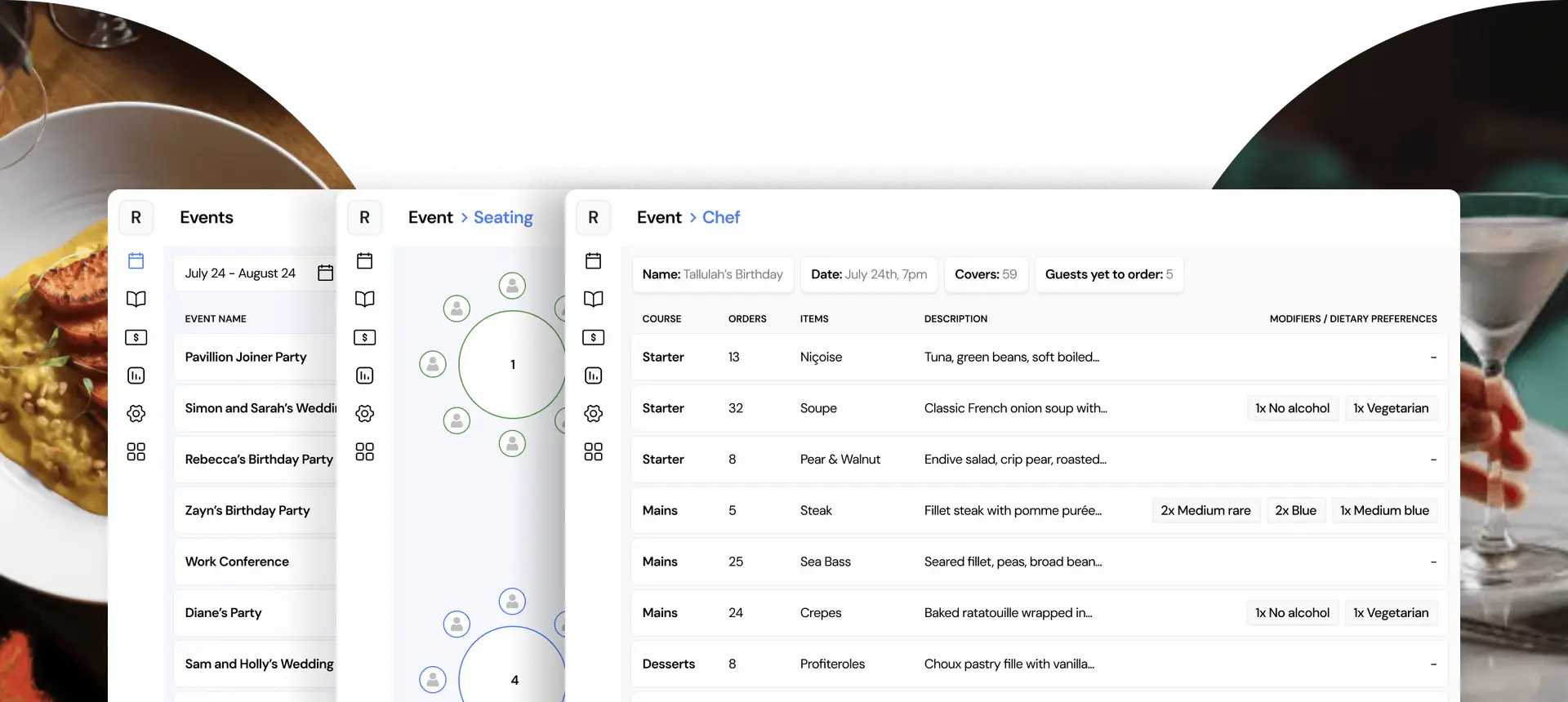
Do not make guests guess whether payment succeeded. Show a confirmation screen, send a receipt and let staff verify the order status. If an order remains pending, label it clearly rather than encouraging another tap, which can create duplicate attempts and later reconciliation work.
Post-event communication should explain the refund timeline in plain terms, identify the transaction and provide a contact route. A white-label guest journey can keep the venue's branding consistent across confirmation, ordering, payment and feedback, reducing the chance that guests assume they have been redirected to an unrelated service.
Staffing, Fees and Service Charge Implications
Guest self-payment reduces till pressure, not labour. Staff still need to explain the process, monitor failed orders, answer payment questions, handle dietary concerns and intervene when a guest cannot complete a transaction. Plan those duties before choosing the payment model.
UK event guidance identifies extra staffing as a cost of pay-as-you-go bars. One UK event caterer adds £150 per staff member for this service, as shown in its private-suite drinks and bar terms. The figure is not a universal tariff, but it shows the labour generic payment advice often misses. Fewer tills do not automatically mean fewer people.
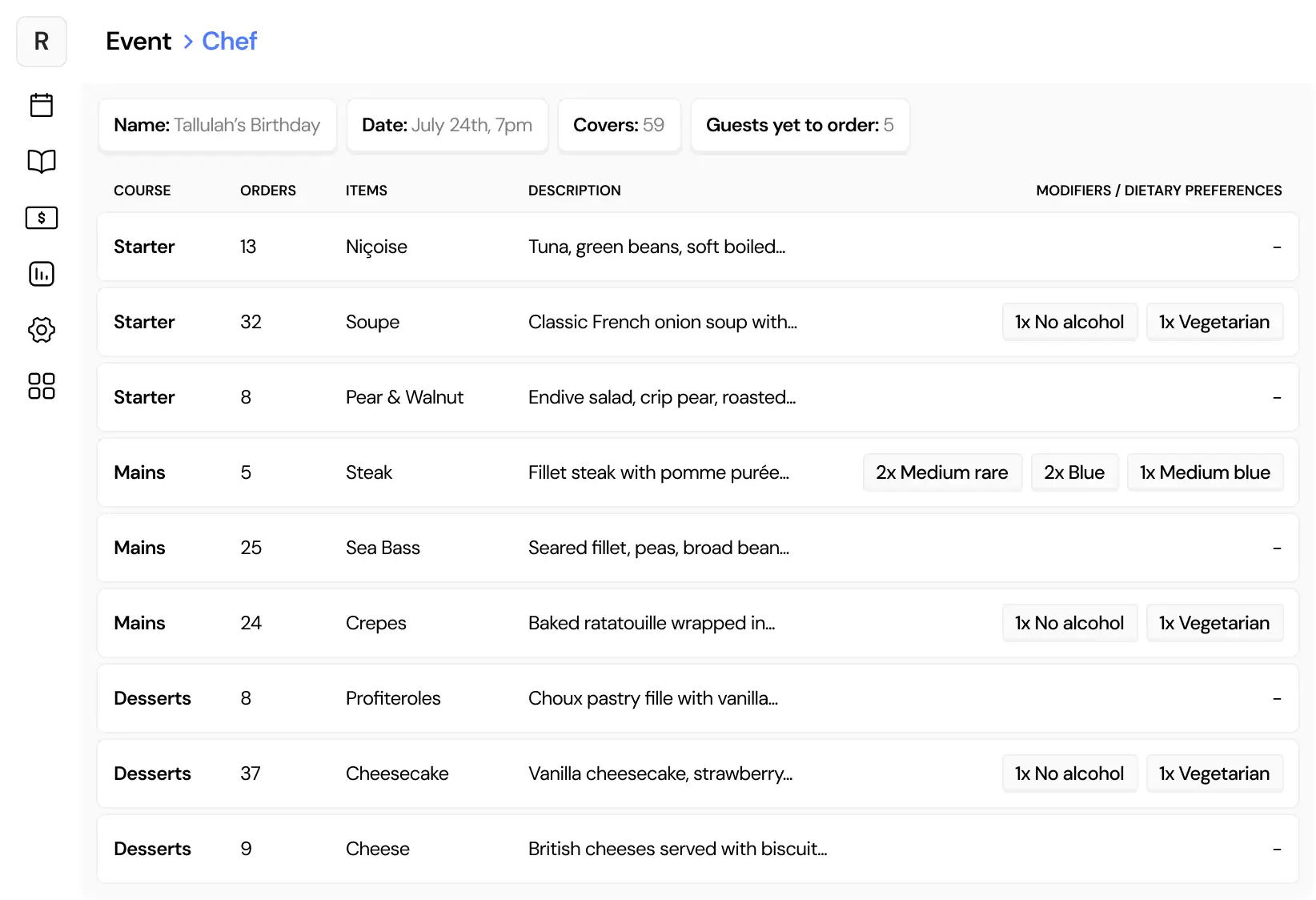
A clear event chef workflow visual can help teams assign floor support, payment assistance and escalation ownership before service begins.
Model the economics accurately
Small orders can generate gateway fees, refunds and dispute administration. Split bills may leave unmatched tips, rounding differences or payments attributed to the wrong guest. QR ordering can shorten queues while increasing demand for floor support and clear device guidance.
Compare the current process with the proposed model across:
- tills and handheld devices
- floor support and payment assistance
- gateway and refund fees
- chargeback investigation
- service-charge distribution
- reconciliation time
- unclaimed or disputed balances
Use the event's actual staffing plan, transaction mix and exception history. A spreadsheet can expose the expected totals, but it will not price the staff time needed to resolve a failed payment during service. Generic event tools may show sales while missing ownership, manual interventions and leakage between payment, order and settlement records. A bespoke build can fit the workflow, but its maintenance, testing and failure handling become venue responsibilities.
UK service-charge treatment depends partly on how the order is taken. Guidance indicates that payment at a bar or similar point generally does not attract a service charge, while table-ordering flows can offer discretionary service-charge options. Configure the charge to match the service delivered, and make the choice clear on receipts.
| Cost Component | Pre-Pay | Pay-at-Table | Split-Billing | Ticketed |
|---|---|---|---|---|
| Till pressure | Lower | Lower | Moderate | Lower |
| Floor assistance | Moderate | Higher | Moderate | Moderate |
| Payment exceptions | Front-loaded | During service | After service | During service |
| Refund administration | Centralised | Item-level | Allocation-dependent | Credential-dependent |
| Spend control | Strong | Moderate | Strong for organiser | Configurable |
A 200-guest event can produce different net margins with the same menu and prices. Pre-payment may protect production and reduce collection work. Pay-at-table can preserve a premium service style but needs more floor coverage. Split-billing keeps the venue's process familiar while shifting administration to the organiser. Ticketed ordering can scale service, while connectivity and credential failures remain risks. Compare final contribution after labour, payment costs, refunds, disputes and reconciliation, not gross takings alone.
Reconciliation, Fallback Plans and a Pre-Event Checklist
An event is not financially complete when the last guest leaves. Start reconciliation with separate reports from the payment gateway, POS and event system. Match gross transactions, refunds, tips, service charges, failed payments and settlement batches against the event order record. Assign one owner for exceptions, with a second person reviewing the final variance.
Use the same sequence after every event:
- Close the event: Stop new orders and record the exact service cut-off.
- Export gateway activity: Capture successful payments, declines, refunds, disputes and settlement references.
- Run POS takings: Compare paid orders with items fired, voids, discounts and manual adjustments.
- Check gratuities: Separate optional tips and service charges so distribution is not mixed with sales.
- Investigate exceptions: Review duplicate refunds, unmatched payments, abandoned orders and no-shows.
- Notify guests: Explain unused balances, refund action and expected timing.
- File the audit trail: Retain event, order, payment and adjustment references under the venue's data policy.
A shared inbox is not an exception process. Practical guidance on solving reconciliation issues can help finance and operations agree who investigates, approves and closes each discrepancy.
Plan for the balances that do not get spent
Cashless event benchmarks report average top-ups of £26, with online top-ups typically £9 higher than on-site top-ups. 20% of online ticket buyers also add a top-up during purchase, rising to 40% at some events. The UK cashless event benchmarks also report that around 6% of revenue remains unclaimed after refunds, while almost 20% of topped-up money can remain unspent when events close, reaching 25% in some cases.
These figures affect both guest communications and the final margin. Publish refund rules before purchase, send balance notifications after close, and give finance a report that separates refundable money from expired or donated balances. If staff-assisted recharging is required, plan for roughly 60 top-ups per hour per cashier. Encourage online pre-payment before arrival to reduce queues and counter workload.
Use a go or no-go check
Forty-eight hours before the event, confirm policy approval, guest communications, device charging, network coverage, staff roles, test transactions, refund permissions, fallback vouchers and the escalation contact. Test the full path, including an order, payment, cancellation, refund and settlement record. On the day, keep a manual outage log with the guest reference, order, amount, payment method and approving staff member.
A fallback must preserve both service and auditability. If the gateway, Wi-Fi connection or reader fails, staff need a defined way to accept payment, record the order and reconcile it later. If the venue cannot identify an order or confirm who approved an exception, guest self-payment is not ready for service.
Creventa centralises event enquiries, proposals, guest pre-orders, allergens, seating, payments, communications, reports and post-event feedback, with public and transparent pricing. For venues handling self-payment across hotels, restaurants, stadiums or multi-site operations, visit Creventa to review a workflow that connects guest orders with operational documents and payment records.
Jake Crimmin, Hospitality Events Specialist, Creventa. Jake works with hotels and venues on event operations, focusing on how pre-orders and allergen data flow from the guest through to the kitchen.