Allergen and dietary management software for events captures each guest declared requirements against their name, then carries them onto the kitchen report, the service list and the place card. Look for all 14 UK declarable allergens and a clear audit trail.
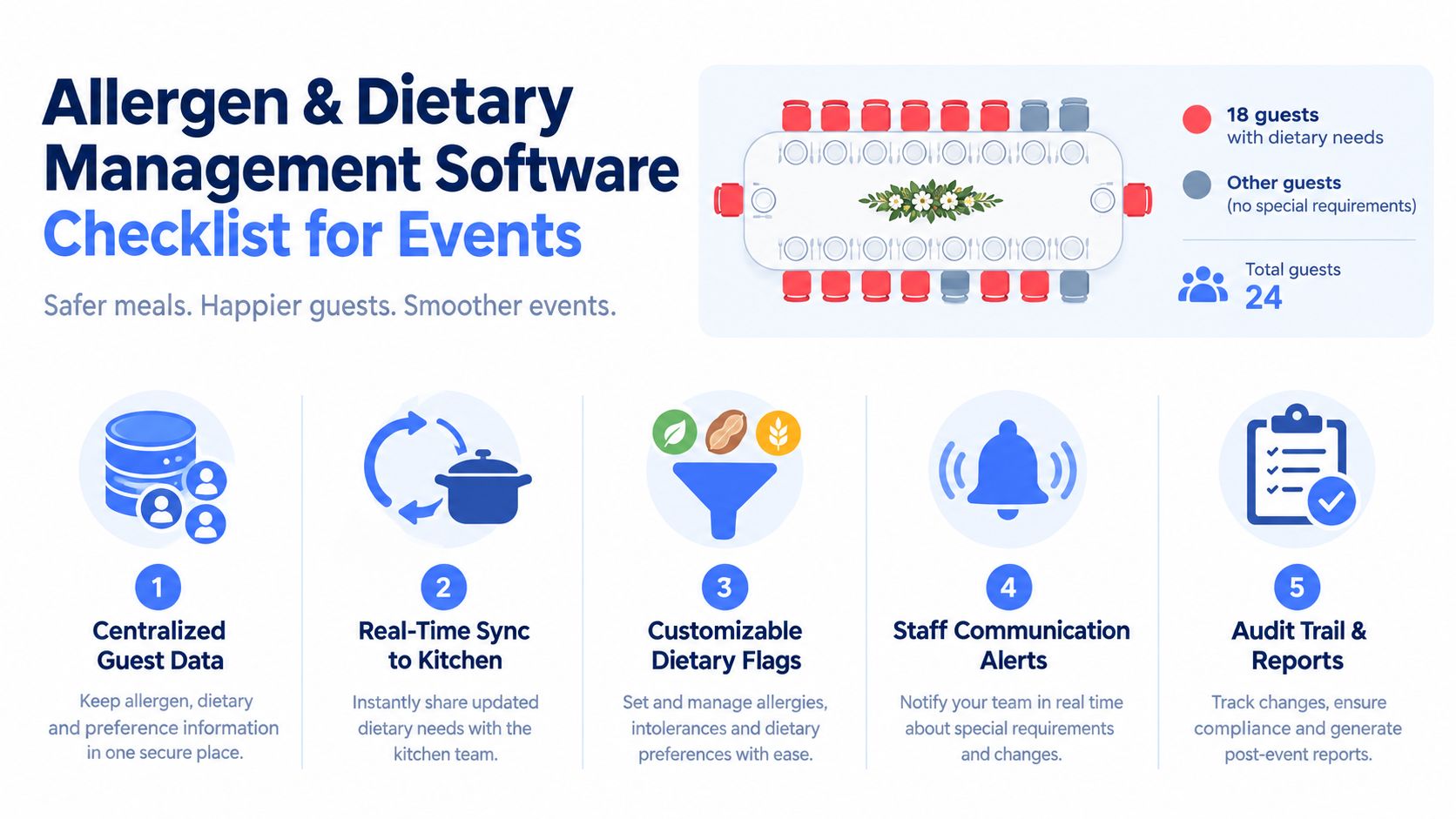
A banquet manager opens the final run sheet and finds that 18 guests have dietary notes missing. The kitchen is already preparing for service, the organiser is asking for table changes, and nobody can say confidently whether a note means a diagnosed allergy, a religious requirement, a preference, or an unverified guest comment. That's the point at which an allergen form stops being an administrative feature and becomes an operational control.
The best allergen and dietary management software for events must connect booking, guest communication, menus, seating, kitchen preparation and service verification. It should support the 14 regulated allergens, record custom requirements, distinguish medical risk from preference, and leave a clear record of what was collected, changed and communicated. It should also fit the venue's actual workflow, because a technically capable platform can still fail if staff have to copy information manually at the busiest point of the day.
| What to compare | Why it matters during an event |
|---|---|
| Allergen capture | Guests and organisers need a structured way to provide complete information |
| Medical versus preference tagging | A severe allergy needs a different operational response from a lifestyle choice |
| Post-booking verification | Last-minute changes must reach the right people before service |
| Seating and kitchen outputs | Staff need guest-specific information where food is prepared and served |
| Audit trail | Teams need to show what information was held and when it changed |
| PPDS and written disclosure support | Labels, menus and kitchen documents must reflect current ingredients |
| Integrations and pricing | The system must justify its cost without creating duplicate work |
Table of Contents
- What to Look For in Allergen and Dietary Management Software for Events
- Why UK Compliance Shapes Your Software Choice
- The Four Approaches Venues Use Today
- Roundup of Leading Tools and Where Each One Fits
- Real-World Scenarios Across Hotels, Stadiums, and Restaurants
- Pricing Transparency and Total Cost of Ownership
- Matching the Right Tool to Your Venue Type
What to Look For in Allergen and Dietary Management Software for Events
Start with the missing-data scenario, not the feature list. If a 240-cover banquet arrives at the kitchen with allergy information absent for 18 guests, ask where the process broke. Was the question never asked, did the guest reply in free text, did an organiser email arrive after the export, or did someone update a spreadsheet without changing the kitchen sheet?
That diagnosis gives you the first evaluation principle: allergen capture is a workflow decision, not a form field. A venue should test the complete journey from invitation to service, including changes after the original booking.
Seven checks for a safer workflow
Capture the requirement at booking. Guests should be able to identify allergens and dietary needs while selecting meals or confirming attendance. Structured fields are more useful than a blank “special requirements” box because they make reporting and follow-up possible.
Enforce the information you need. The platform should allow required questions where appropriate, while still giving staff a safe route for exceptions. Mandatory capture only helps if the system can distinguish “no requirement” from “not answered”.
Use meaningful dietary categories. The system should support the 14 regulated allergens and custom allergies, but it should also separate medically significant allergies from preferences such as vegetarian, vegan or religious dietary choices. A free-text note can provide context, but it shouldn't carry the entire control process.
Build in post-booking verification. Guests change dishes, organisers add attendees and suppliers substitute ingredients. Look for reminder workflows, timestamps, named records and a way for staff to confirm requirements again before preparation. The practical mechanics of allergen tracking in event catering matter more than the length of the initial questionnaire.
Connect the seating plan to the dietary flag. A front-of-house team needs to know where a guest is sitting without searching through an unrelated guest list. Place cards, table plans and service reports should carry the right level of visibility without exposing unnecessary personal information.
Produce kitchen-ready reports. Useful outputs include cover counts by requirement, ingredient or allergen matrices, custom dish instructions, buffet labels, kitchen sheets and service summaries. Exporting a raw CSV may be technically possible but operationally weak if staff must interpret it manually.
Test integrations and permissions. Check whether the platform connects with the venue's PMS, CRM, POS, kitchen display system and registration tools. Also ask how permissions work. Front-of-house staff may need guest-facing flags, while kitchen staff need production detail and managers need audit records.
Practical rule: Ask the supplier to demonstrate the hour before service, not just the booking form. That's where stale data, duplicate entry and unclear ownership become visible.
A strong system should propagate a recipe, supplier or guest change to the documents and screens that depend on it. UK compliance guidance also places weight on written, accurate information and staff communication, so the software should support both rather than treating a verbal conversation as a replacement for a written record.
Why UK Compliance Shapes Your Software Choice
UK rules make allergen management a traceability problem. The Food Information Regulations 2014 made allergen disclosure mandatory for non-prepacked food, while Natasha's Law, passed in September 2019 and effective from 1 October 2021, requires prepacked for direct sale, or PPDS, food to carry a full ingredients list with the 14 regulated allergens clearly emphasised. The regulatory background is summarised in this UK allergen law guide for food businesses.
For an event venue, that burden appears across several touchpoints. A guest may provide information during registration, change a meal after booking, receive a canapé at a reception, and collect a labelled item from a buffet. The record needs to remain tied to the right person, event and menu version throughout that journey.
Compliance needs an operational record
The Food Standards Agency's research shows the execution gap. 78% of food business operators selling PPDS food said they currently label all allergenic ingredients, while only 62% said they label all of them consistently. The Food Standards Agency research report makes the distinction important. A venue may have a policy and still struggle to apply it every time menus, staff or service conditions change.
That's why buyers should look for:
- Named guest records: Each request should connect to a person rather than an anonymous table note.
- Version history: A change to a recipe, supplier product or guest selection should leave a dated trail.
- Written outputs: Kitchen sheets, labels and service documents should reflect the current information.
- Point-of-order access: Staff need accurate information when food is ordered and delivered, not only during planning.
- Exportable evidence: Managers should be able to retrieve records for internal review or an Environmental Health Officer.
The UK government guidance also states that allergen information must be provided when food is delivered, either in writing or orally. Public guidance for event food further makes clear that food offered free of charge, including canapés, still requires allergenic ingredient information. That means a ticketing or registration tool that collects a checkbox but cannot support kitchen handoff or written disclosure may leave the most important part of the process outside the system.
A platform designed around hospitality can therefore function as a compliance asset. It doesn't remove the need for trained staff or supplier checks, but it can reduce the number of times someone has to copy, interpret or re-enter a dietary instruction. Venues should use this allergen compliance checklist for hotel event pre-orders when testing whether a product supports the complete workflow.
The Four Approaches Venues Use Today
Most venues fall into one of four operating models. None is automatically right for every business, and the cost of moving to a new system can be disproportionate if the venue runs few events or already has strong controls. The relevant question is whether the approach survives the handoff from guest response to production and service.
| Approach | Strengths | Weaknesses | Best fit |
|---|---|---|---|
| Spreadsheets and email | Familiar, inexpensive to start, easy to alter | Manual copying, unclear ownership, weak audit trail, limited live kitchen visibility | Small teams with low event complexity and strong manual checks |
| Generic event tools | Better registration and centralised responses, useful guest communications | Allergen fields may be free text or basic checkboxes, reporting often needs interpretation | Events where dietary collection is secondary to registration |
| Bespoke builds | Can mirror a venue's exact process and internal terminology | Longer implementation, specialist maintenance, slower regulatory changes | Large operators with dedicated technical resources |
| Hospitality-built platforms | Designed around pre-orders, seating, menus, kitchen reports and service | Licensing and implementation need careful evaluation, pricing may vary by scope | Hotels, stadiums, restaurants and groups running regular food-led events |
Spreadsheets and email remain understandable choices. They require no procurement project, and experienced staff can build a workable routine. The weakness appears when a guest changes a requirement, a supplier changes an ingredient or several people maintain separate versions of the same document. There's no dependable live view unless someone creates one.
Generic registration platforms improve collection, especially where guests select meals during RSVP. They can still treat allergies as a custom question rather than a controlled data type, which creates extra work for chefs and event managers. A venue should ask whether the output is kitchen-ready or a better spreadsheet.
Bespoke software offers control, but control brings responsibility. The venue owns the maintenance burden, integration work and regulatory updates. Hospitality-built platforms reduce that development effort by starting with established event patterns such as seating, pre-orders and function sheets. The trade-off is that buyers may need to adapt some internal processes rather than receiving a perfect replica of every local habit. For a closer look at that category, review the banquet event order software workflow.
Roundup of Leading Tools and Where Each One Fits
A fair comparison should separate platform category from brand recognition. The strongest choice depends on the venue's service model, its existing systems and how much operational work the team wants the software to absorb.
| Platform category | Allergen capture, 14 UK | Seating integration | Pre-order workflow | Reporting and audit export | Best for |
|---|---|---|---|---|---|
| Spreadsheets and email | Possible, but manual and inconsistent | Separate file or manual reference | Email replies and manual consolidation | Weak version control | Small, infrequent events |
| Generic event registration | Usually configurable, but taxonomy may be limited | Often basic or external | Useful for RSVP meal choices | Export may need cleaning | Registration-led events |
| Bespoke build | Can be comprehensive if specified correctly | Can be deeply tailored | Can mirror internal processes | Depends on build quality | Groups with technical ownership |
| Hospitality-built platform | Designed for regulated allergens and custom requirements | Usually central to the workflow | Guest links, reminders and structured choices | Kitchen, seating and compliance outputs | Food-led events across venues |
| Recipe and menu allergen system | Strong at ingredient-level mapping | May need a separate event layer | May not manage invitations or seating | Strong menu and label records | Food production and menu governance |
Hospitality-built platforms
This category is the closest fit for venues where allergen information must travel with the guest. A relevant system should capture the 14 mandatory allergens plus custom triggers, distinguish preference from medical allergy, place flags on seating materials and generate reports for front-of-house and back-of-house teams. It should also support changes without forcing staff to reprint or rebuild every document.
Creventa is one example of this approach. Its core platform combines guest pre-orders, allergen tracking, seating, place cards and reports, while its wider product set includes enquiry and proposal workflows, pre-event ordering and payment, and post-event feedback and guest insights. Creventa says it tracks the 14 mandatory allergens alongside custom requirements, can create custom dishes for severe allergies that flow into reports, and flags allergens on place cards for service visibility. It integrates with Delphi, Opera Cloud, SevenRooms, OpenTable, Guestline or RezLynx, Stripe, Adyen and PlanetPay where those connections are relevant to the venue.
Its trade-off is the same as other hospitality-built systems. The venue should verify the exact integration, permissions, label format and implementation process in a live demonstration. It's also sensible to compare the platform with other UK hotel and venue workflow options without assuming that one architecture suits every operation.
Generic and specialised categories
Generic event tools can be useful for collecting meal choices, especially when the main requirement is registration and a simple export. Buyers should probe whether they handle custom allergies, severity, table assignments, repeat verification and written kitchen documents. A separate online menu resource can help venues present dietary information clearly, including guidance on how to create an allergen-friendly menu online, but menu presentation alone doesn't replace guest-to-kitchen traceability.
Recipe-focused software often provides better ingredient mapping, supplier records, menu updates and PPDS label generation. Its limitation may be event orchestration. If it doesn't manage named guests, seating, last-minute changes and service reports, the venue may still need another layer.
Bespoke builds can outperform packaged platforms in narrowly defined environments, but only if the specification includes PPDS labelling, visitor-facing disclosures, audit trails and permissioned access. A product that lacks explicit support for those requirements should be treated cautiously, regardless of how polished its dashboard looks.
Real-World Scenarios Across Hotels, Stadiums, and Restaurants
A useful test is to run a recent difficult event through each approach. The question isn't whether the system can store an allergy. It's whether the right person receives the right instruction at the right point in service.
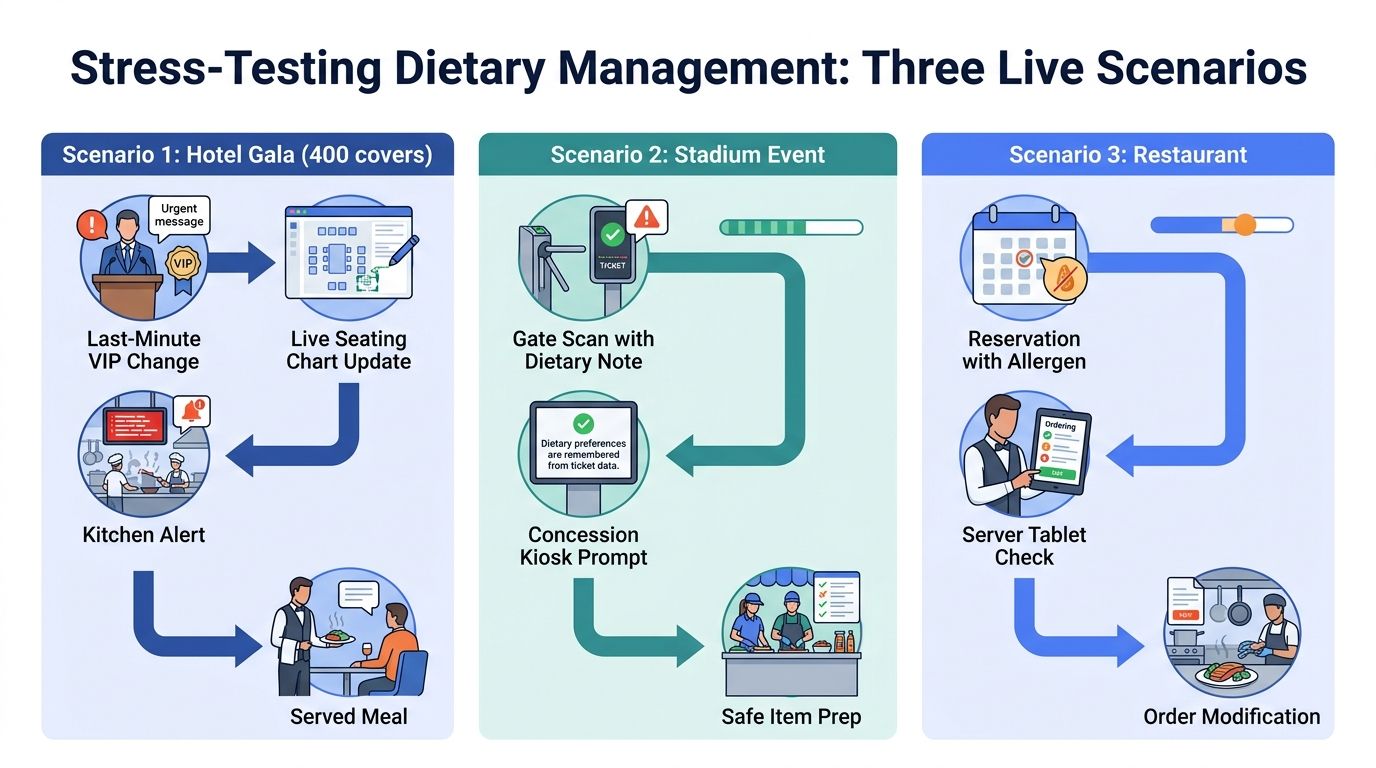
The hotel gala
A 400-cover hotel gala has multiple table plans, VIP upgrades and a late dietary change from the organiser. A spreadsheet can record the change, but staff must ensure it reaches the seating plan, chef report, place card and service team. A hospitality-built platform with seating overlays and kitchen synchronisation has a clearer path, provided the team confirms the change and the kitchen accepts the updated instruction.
The compromise is implementation discipline. A digital platform won't protect a venue if staff continue to circulate parallel email instructions. The event manager needs one controlled record and a defined cut-off or escalation process for changes.
The stadium suite
A stadium hospitality operation may serve 1,200 guests across boxes and lounges. Booking-partner imports, fast service and several preparation points place pressure on integrations. Badge or QR-linked dietary notes, station-specific kitchen tickets and rapid confirmation matter more than an intricate invitation design.
A generic registration tool may capture the original requirement but struggle to route it to the correct concession or suite. A hospitality-built system is more suitable where the venue can connect the guest record to the service location. The stadium hospitality pre-order workflow is the kind of process buyers should test with real ticket and suite data.
The private dining event
A 60-cover restaurant event may have fewer guests but more medically complex requirements. Here, ingredient-level traceability can matter more than a large seating planner. Staff need to connect each dish modification to the guest, confirm the recipe and preserve the decision in the service record.
Spreadsheets may be adequate for a very small team with a strong chef-led process, but they make version control fragile. A recipe-focused system paired with a reservation workflow can work well, while a hospitality-built platform may be preferable if the restaurant also manages pre-orders, seating and payment.
Food safety controls sit alongside wider operational protection. Operators reviewing food and beverage cover for hospitality businesses should still treat insurance as a complement to, not a substitute for, accurate allergen processes. Each scenario favours a different balance of scale, traceability and integration depth.
Pricing Transparency and Total Cost of Ownership
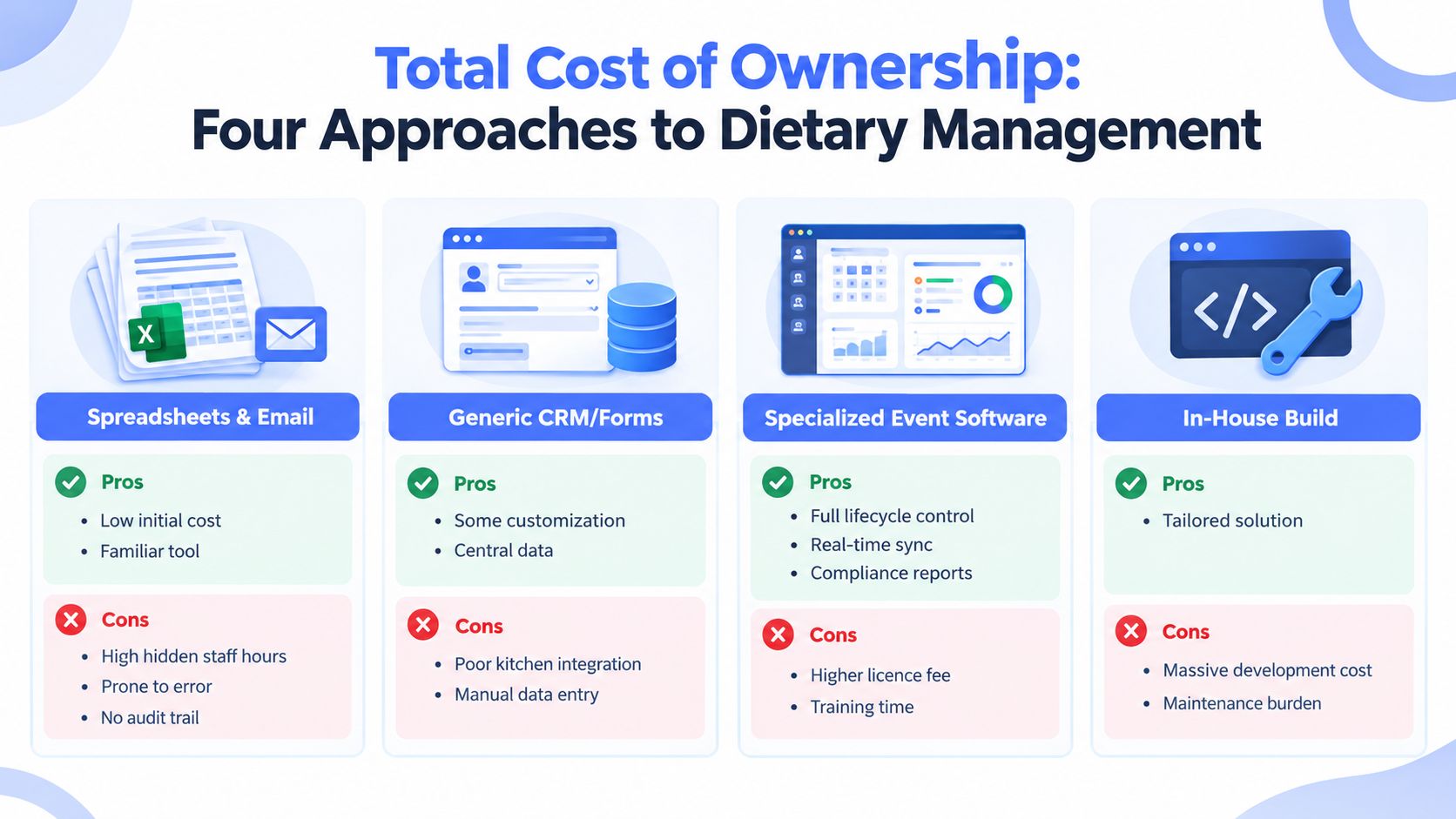
The subscription price is only one part of the decision. A spreadsheet may cost little to open, but staff still spend time chasing replies, reconciling table plans, checking recipe changes and correcting documents. The hidden cost grows when several versions circulate and nobody can prove which one the kitchen used.
Generic event tools may charge by event, attendee or module. They can be economical when allergen handling is simple, but additional reporting, integrations or structured dietary fields may change the calculation. Ask for the cost of exports, implementation, support, data migration and extra users, not just the headline licence.
Bespoke software has the opposite profile. It can match the venue closely, but the business funds discovery, development, testing, integration and ongoing maintenance. A regulation change or new service point becomes a product task rather than a configuration change.
Hospitality-built platforms often bundle guest capture, seating, pre-orders, reports and documents around a venue or event workflow. That can reduce duplicated work for operators running regular banquets, weddings or hospitality programmes, although implementation and training still need a realistic budget. Creventa's pricing is public and transparent, so buyers can assess its published structure rather than treating the commercial model as an unknown.
The cost of an allergen failure is not limited to reprinting a menu. It can include enforcement exposure, investigation time, reputational harm, guest distress and civil liability. That doesn't mean every venue needs the most elaborate system. It does mean the buyer should price the manual controls required to make a cheaper option dependable.
Advance food selection can also support production planning. UK hospitality waste guidance describes ordering and selecting meals as far forward as possible as a cook-to-order approach, linking earlier guest choices with tighter preparation decisions. Software should therefore be assessed for both compliance control and the quality of the operational data it gives the kitchen.
Matching the Right Tool to Your Venue Type
Feature counts can distract from workflow fit. A venue should choose the system that handles its busiest handoffs, not the one with the longest product page.
| Venue type | Best-fit approach | Operational priority |
|---|---|---|
| Large hotel | Hospitality-built platform, potentially paired with recipe controls | Pre-orders, table-plan reconciliation, labels, PMS connection and audit records |
| Stadium or arena | Integrated hospitality platform | High-volume imports, suite or station routing, fast dietary changes and service visibility |
| Private dining restaurant | Reservation-linked dietary workflow or lightweight hospitality platform | Ingredient traceability, named guest records and server access |
| Golf club or banqueting venue | Hospitality-built platform | Repeat guest history, flexible seating, menus and central event reporting |
| Multi-site group | Centralised hospitality platform with group permissions | Consistent data, venue-level reporting and controlled menu updates |
Large hotels need configurable forms, table-plan reconciliation and chef-ready documents that connect to the main property system. They should test weddings, conferences, buffets and pre-ordered banquets separately because the service pattern changes even when the compliance principle stays the same.
Stadiums should prioritise speed and routing. Ask whether the platform can identify the guest's suite, box, lounge or service station, and whether a late change reaches the correct team without reissuing an entire paper pack. Barcode or QR connections may be useful, but only if the underlying dietary record is accurate and staff know how to act on it.
Private dining restaurants don't always need a full event suite. A focused workflow layered onto the reservation system may be enough if it preserves ingredient-level traceability and gives servers a clear confirmation step. Clubs and banqueting-only venues often sit between the hotel and restaurant models, making seating, repeat guest history and kitchen reports more valuable than broad registration features.
Treat every demo as a workflow audit. Give each supplier your worst recent dietary incident and ask them to run it on screen, including the last-minute change, guest confirmation, kitchen handoff and service record. The tool that handles that moment clearly deserves the shortlist, even if another product has more features.
Creventa brings together guest pre-orders, allergen and dietary tracking, seating, place cards, kitchen reports, payments and post-event feedback for hospitality venues. If that matches your operating model, visit Creventa to review the platform and its transparent pricing, then request a demonstration using a real event workflow rather than a generic sales scenario.
Andrew Norton, Head of Product, Creventa. Andrew leads product at Creventa after years working with hospitality venues on the admin gap between a confirmed booking and event day.