A venue team can spend weeks comparing event platforms, then discover during the first busy service that the chosen system handles enquiries beautifully but leaves the kitchen working from a spreadsheet. That failure usually starts before the demonstrations. The team hasn't agreed whether it's buying a sales system, a booking diary, a guest-management system, a ticketing engine, or several disconnected tools under one contract.
The right way to choose event management software for your venue is to define the operational job first, then test whether the platform supports it from enquiry through post-event feedback. UK venues operate at meaningful scale. The 2024 UK Events Report estimates annual sector value at £61.6 billion, including £16.3 billion from meetings and conferences, £10.9 billion from exhibitions and trade fairs, and £28.053 billion from outdoor, music, festival and sport events. The report also identifies 10,000+ venues, 570,000 full-time jobs, and 1.3 million business events each year across the UK. Read the 2024 UK Events Report
Table of Contents
- Introduction What Job Are You Actually Buying Software to Do
- Define Your Requirements and Map Your Current Stack
- Hospitality Specific Features That Decide Success or Failure
- Build Your Scoring Matrix RFP and Pilot Plan
- Implementation Change Management and Measuring ROI
- Final Selection Checklist and Next Steps
Introduction What Job Are You Actually Buying Software to Do
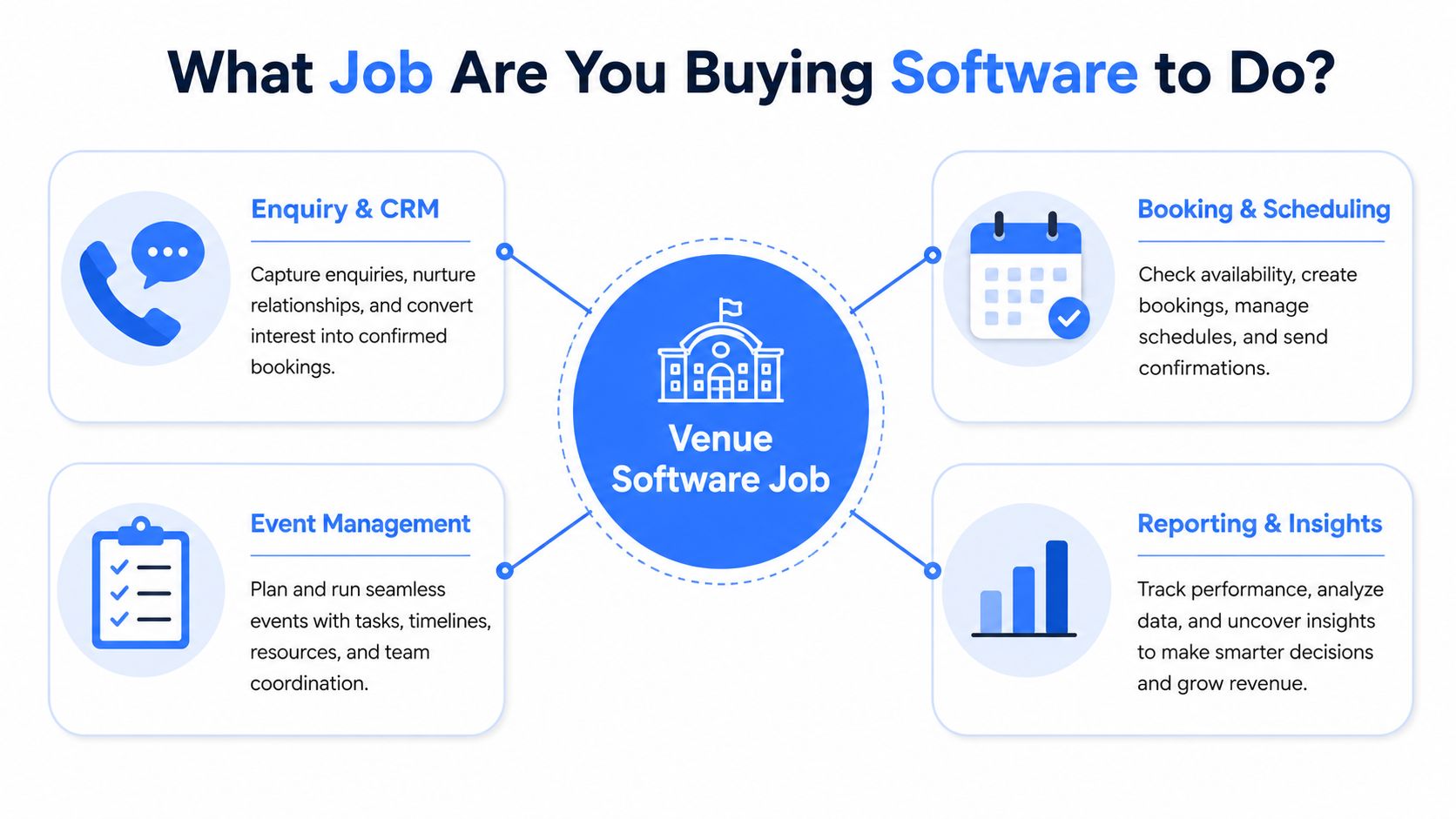
Start with the work, not the feature list. A hotel may need enquiry management and CRM for group sales, a function diary, proposals, quotes, deposits, guest pre-orders, seating, BEOs, and post-event reporting. A restaurant may care more about ticketing, payments, menu choices, dietary records, and kitchen-ready service sheets. A stadium or golf club may need a combination of ticket availability, hospitality packages, table plans, and reporting across multiple spaces.
Write down the jobs your team must complete:
- Enquiry and CRM: Capture leads, track stages, record follow-ups, issue proposals and quotes, and measure lead sources.
- Booking and scheduling: Maintain the function diary, prevent clashes, assign spaces and resources, and control changes.
- Event operations: Manage BEOs, menus, guest counts, seating, place cards, run sheets and internal approvals.
- Ticketing and availability: Sell places or packages, control capacity, and show accurate availability to guests and staff.
- Guest pre-orders and dietaries: Collect choices per guest, send reminders, record allergies and dietary requirements, and turn selections into service documents.
- Deposits and payments: Take deposits or pre-payments through a PCI-compliant payment workflow and reconcile what's owed.
- Forecasting and pace: Track booking movement, expected covers, revenue, menu demand and operational workload.
- Reporting and feedback: Give managers usable reports after the event, including guest history, response activity and feedback.
Most venues end up needing two software layers. The first is a sales CRM that helps the team win and progress business. The second is a post-booking guest-management layer that turns a confirmed event into accurate orders, seating plans, allergen records, payments and kitchen paperwork. Few platforms handle both jobs equally well. A system that excels at lead capture may be weak at guest-level menu choices, while a system built for event-day operations may offer limited sales pipeline control.
Practical rule: If a supplier demonstrates only the booking journey, ask to see the confirmed-event workflow immediately.
Integrations matter because your event database shouldn't become another isolated record. Check how the platform connects with your PMS, sales systems, payment provider, finance processes and communications. Review what event management software covers before building your requirements list, particularly if your team is treating ticketing, pre-orders and event operations as separate purchases.
Guest experience deserves equal attention. A branded form with clear questions, automatic reminders and mobile-friendly payment can reduce friction. The platform should also produce reports your teams can use without exporting data into a second spreadsheet. Finally, assess pricing model and implementation speed. A low subscription price can become expensive if you need extra licences, integrations, manual administration or a long rollout.
Define Your Requirements and Map Your Current Stack
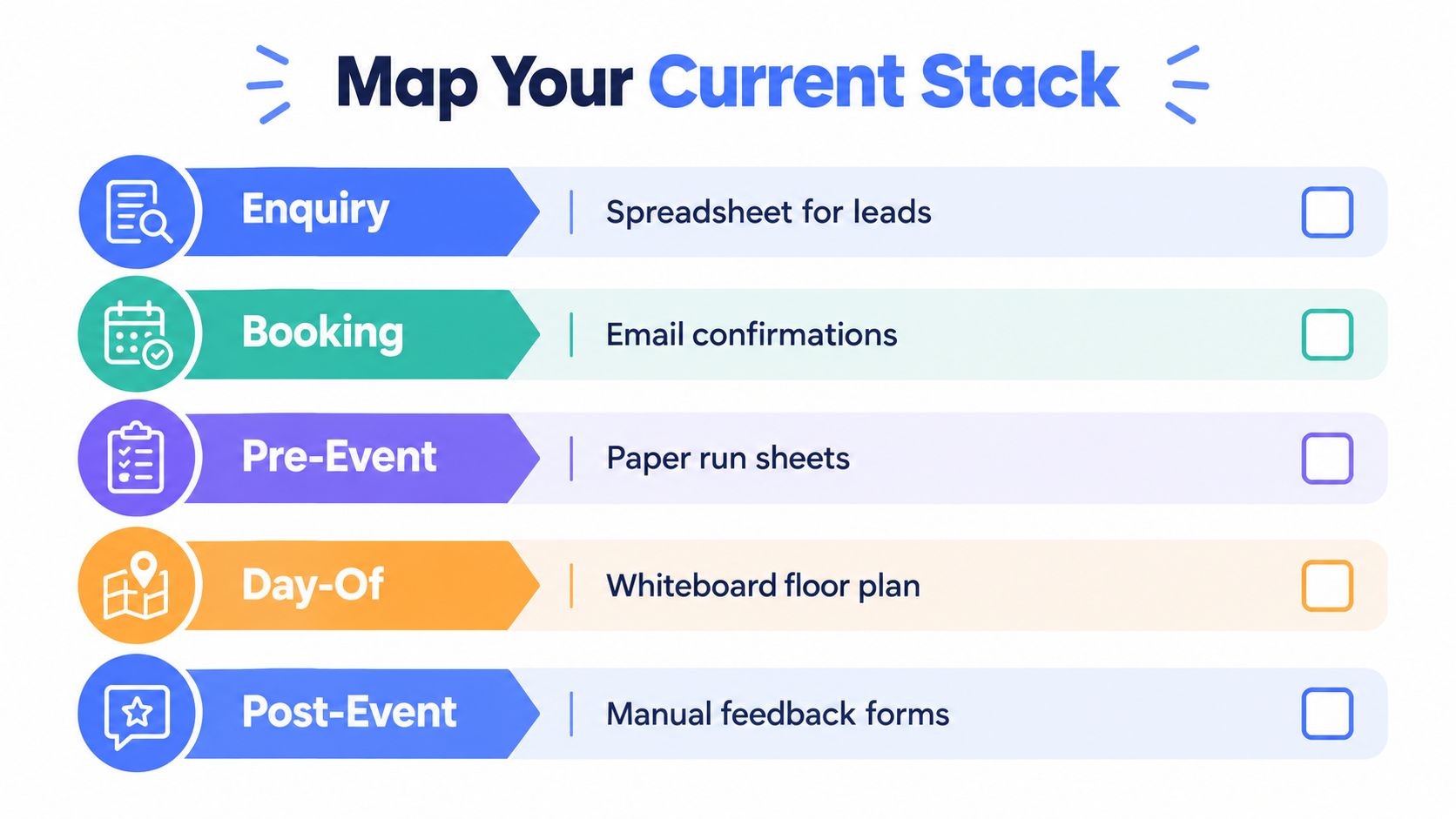
Before speaking to suppliers, document how an event moves through your venue today. Don't rely on what the process is supposed to be. Follow a real booking from its first enquiry to the final feedback request, and record every hand-off, duplicate entry, approval and delay.
Audit the five operating stages
At enquiry, identify where leads arrive, who qualifies them, and how the team records response dates, budgets, event types and lost business. At booking, map contracts, deposits, date holds, room allocation, menu confirmation and changes. Don't ignore the informal controls, such as a shared diary or an email that only one coordinator knows how to find.
At pre-event, list every guest communication and manual rekeying step. This includes invitation forms, menu choices, allergen questions, reminder emails, payment links, table plans and place cards. During day-of operations, record which documents the front of house, kitchen, bar and events team use. Post-event mapping should cover feedback, guest history, revenue review and follow-up.
Write down the current tool beside each task. Include spreadsheets, shared drives, inboxes, paper forms, messaging channels, payment terminals and specialist systems. The point isn't to criticise staff. Manual work often exists because the current system can't handle a practical exception, such as a shared table, a late dietary change or a guest paying separately.
Involve every team that touches the booking
Events software affects more than the sales office. Ask front of house which information arrives too late, ask the kitchen which reports are unreliable, and ask finance where deposits or final payments become difficult to reconcile. Marketing should explain which guest data it needs, while site managers should identify differences between venues.
A hotel, restaurant, stadium, golf club and multi-site operator won't have identical requirements. A hotel may need PMS synchronisation and room-event context. A stadium may need package capacity and ticketing. A golf club may need member preferences alongside event bookings. A multi-site group needs consistent processes without forcing every venue into an identical operating model.
For a broader view of the surrounding technology stack, the MAJC best restaurant scheduling software resource can help teams think about rota and scheduling dependencies alongside event workflows. Keep that exercise separate from the event-platform decision, but document where staff scheduling affects service delivery.
Turn observations into a requirements brief
Separate must-haves, important capabilities and nice-to-haves. A must-have should be tied to a real operational risk or commercial requirement, not a preference expressed during a demo. For example, per-guest allergen capture may be mandatory for a venue serving shared menus, while advanced campaign automation may be useful but secondary.
Your brief should include:
- Event types: Weddings, meetings, private dining, conferences, ticketed events, festivals, match-day hospitality or recurring functions.
- Operational scale: Guest counts, number of spaces, sites, event frequency and seasonal peaks.
- Users and permissions: Sales, events, kitchen, front of house, finance, marketing and management.
- Data requirements: Guest records, preferences, order history, dietary information, payments and feedback.
- Integration requirements: PMS, CRM, payment gateways, ticketing, finance and reporting destinations.
- Success measures: Less manual entry, faster response, cleaner handovers, improved payment collection and reliable event reporting.
Map the integrations before you shortlist suppliers. The Creventa integrations overview is a useful reference for checking whether a platform can sit within an existing hospitality stack rather than forcing a replacement programme.
Hospitality Specific Features That Decide Success or Failure
A platform can look complete in a demonstration and still fail during a Saturday service. The deciding test is whether it supports two different jobs: sales CRM, which manages enquiries and conversion, and post-booking guest management, which turns confirmed details into actions for kitchen, front of house and finance. Few systems handle both equally well. Score them separately.
Guest pre-orders should capture individual choices, send reminders and accept late changes without forcing coordinators to rekey information. A menu total does not give the kitchen enough detail. Staff need to see who ordered each item, which guests have allergies, which tables are affected, and whether the final count matches the payment record.
UK allergen controls make the data model important. Food businesses must declare the presence of all 14 major allergens, while buffet information must be provided for each food item rather than for the buffet as a whole. Allergen information must be available before purchase is completed and again when food is delivered. Review the government's allergen guidance for food businesses
Sealed food sold at events creates a second requirement. In England, Wales and Northern Ireland, PPDS food must carry the food name and an ingredients list with allergenic ingredients emphasised wherever they appear. Event caterers are included in the government guidance, so pre-order data may need to produce labels as well as service lists. See the guidance for event caterers on PPDS labelling
Payment handling should sit in the same workflow as deposits, pre-orders and guest records. The platform needs PCI-compliant payment handling, clear payment status and a reliable reconciliation path. The Food Standards Agency's out-of-home allergy information guidance also reinforces the need for accurate, accessible food information during service.
A practical hospitality feature set includes a seating planner, place-card generation, ticket availability, BEOs, kitchen sheets, function sheets and table reports. White-label forms matter because guests should recognise your venue throughout the booking journey, rather than an unrelated supplier.
| Feature Area | Why It Matters | Priority by Venue Type |
|---|---|---|
| Guest pre-orders | Converts menu choices into reliable kitchen and service data | High for hotels, restaurants, clubs and hospitality packages |
| Allergen and dietary capture | Supports item-level disclosure and safer handovers | High for every venue serving food |
| Seating and place cards | Reduces manual floor-plan changes and service confusion | High for private dining, weddings and hosted hospitality |
| Ticketing and availability | Controls capacity and gives guests accurate purchase options | High for ticketed events, stadiums and recurring programmes |
| Deposits and payments | Reduces chasing and connects payment status to the booking | High for venues taking advance payment |
| BEOs and operational reports | Gives FOH, kitchen and finance a shared event record | High for multi-team events |
| PMS and payment integrations | Prevents duplicate records and disconnected reconciliation | High for hotels and multi-site operators |
| Feedback and guest history | Supports follow-up, retention and future personalisation | Medium to high for repeat-event businesses |
For hotels and venue groups, assess commercial and operational workflows independently before judging the combined result. An event CRM for hotels and venues should be judged on the handover from sales to delivery, not on the number of fields in its CRM.
Creventa combines enquiry and proposal workflows with pre-orders, allergens, seating, place cards, reports, ticketing, payments, feedback and guest insights. It connects with PMS, reservation and PCI-compliant payment systems through live two-way synchronisation. Verify each claimed workflow in a pilot, using a realistic booking and the documents your teams issue. A polished demo proves presentation quality, not operational fit.
Build Your Scoring Matrix RFP and Pilot Plan
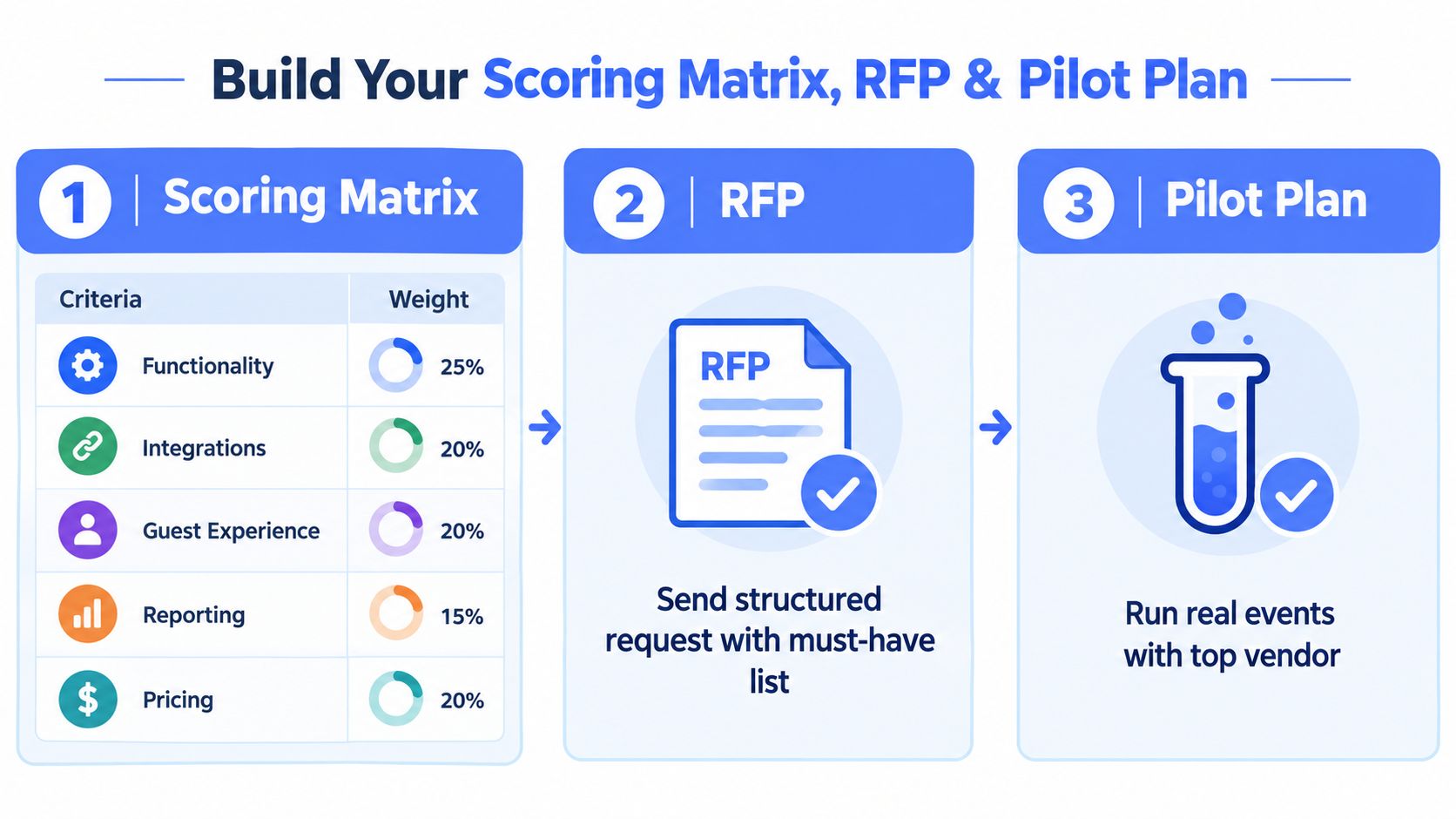
A shortlist becomes useful only when every supplier answers the same questions and demonstrates the same workflow. Build a scoring matrix before the demonstrations, then give each platform the same realistic booking. This prevents the most polished presentation from winning by default.
Score the jobs that matter
Use a simple weighted matrix. Functionality, integrations, guest experience, reporting, pricing, support and implementation should all appear as separate criteria. Weight them according to your venue's risks. A restaurant group dependent on pre-orders should give guest-level ordering and operational reports more influence than virtual-event features. A conference centre may put scheduling, resources and complex bookings higher.
Score evidence, not promises:
- Demonstrated: The supplier completes the workflow using your scenario.
- Configurable: The workflow exists but needs setup or agreed configuration.
- Integrated: Another system completes the task and the data flow works in both directions where required.
- Roadmap: The supplier says it may become available later. Treat this as unavailable for the decision.
- Manual workaround: Staff must export, rekey or maintain a parallel record.
The UK venue SaaS analysis cited in the brief found that SMBs average 72 SaaS subscriptions and waste 47% to 53% of licences. It also estimates structural duplication at 30% to 40% across venue archetypes, with indicative annual software spend from about £21,000 to £230,000 before VAT. Review the UK events industry SaaS stack analysis Use those figures as a warning against licence sprawl, not as a prediction of your own cost.
Make the RFP operational
Ask every vendor to respond to the same questions:
- Can one guest record hold menu choices, allergen information, payment status, seating and communication history?
- Can a late guest change be reflected in the kitchen report without manual re-entry?
- Which PMS, CRM and payment integrations are live, and what data synchronises?
- Is ticket availability updated in real time?
- What does the standard price include, and what creates additional charges?
- Who owns the data, and how can it be exported if the contract ends?
- What support hours apply during live events?
- Which configuration can venue staff manage themselves?
- What training, migration and implementation work is included?
- Can the vendor show reporting from a completed event rather than a blank dashboard?
The event software evaluation guide can help structure this exercise, but your own operating scenarios should remain the final test.
Pilot with a live booking pattern
Use one confirmed event, one ticketed or capacity-led scenario if relevant, and one booking with dietary complexity. Ask the sales coordinator to create the enquiry, the guest to complete the form, the kitchen to review the report, and finance to reconcile the payment. If the supplier won't let operational users test the system, the pilot isn't credible.
Measure the number of manual touches, unclear handovers, duplicate records and exports required. Also test what happens when the guest count changes, a table moves, a menu item is replaced or a payment fails. Those exceptions reveal more than a smooth demonstration.
Implementation Change Management and Measuring ROI
The contract isn't the finish line. A venue can buy appropriate software and still fail because staff continue using old spreadsheets, managers haven't agreed new ownership rules, or the kitchen receives reports in a format nobody trusts.
Implementation speed belongs in the buying decision. Some platforms take weeks or months to roll out because they require extensive configuration, integrations, data migration and training. Lighter tools, including Creventa, report setup in a couple of days. Verify the actual timeline for your venue, not the standard timeline shown in a presentation.

Roll out the operating model, not just the software
Nominate one owner for the event record and define when each team updates it. Decide who confirms menus, who signs off allergen information, who manages seating changes, who reconciles deposits and who sends post-event feedback. Without these rules, the platform becomes another place where incomplete information accumulates.
Clean the existing data before migration. Remove duplicate guests, archive obsolete enquiries and agree consistent names for rooms, menus, event types and payment statuses. Import only information the team will use. A messy spreadsheet transferred into a new system remains a messy operating model.
Train by role. Sales staff need enquiry and proposal workflows. Coordinators need guest forms, reminders and seating. Kitchen and front-of-house teams need reports and change visibility. Finance needs payment and reconciliation views. Use a real event during training, then keep a short written process for late changes and service-day exceptions.
Establish a baseline before launch
Measure the current process before implementation:
- Time from enquiry to first response.
- Number of manual entries per booking.
- Time spent chasing menu choices and payments.
- Number of corrections to seating, dietary records and kitchen sheets.
- Time required to prepare event documents.
- Guest response rate to pre-order invitations.
- Food waste and unplanned production.
- Time needed to produce post-event reporting.
The UK hospitality survey in the brief found 73% of operators already tracked events or bookings using software or a booking platform, while 33% still relied on paper and pen. It also reported that 34% of restaurants and 39% of pubs didn't use software booking platforms, and 60% of operators said large bookings and events were important to business. Review the UK hospitality booking survey Those findings point to a practical rollout priority: replace manual capture first, then improve automation and reporting.
Track results after launch using the same definitions. Supplier claims should be checked against your baseline and references. Creventa reports a 251% wet spend uplift from drink pre-orders at a Holiday Inn hotel, around 20% less food waste reported by a global hotel chain, over 2 million festive dishes ordered through Creventa at Christmas 2025, events ranging from 4 to 2,500+ guests, and a 99.2% guest response rate to pre-order invitations. Treat these as vendor-reported outcomes, not guaranteed results for your venue.
For data migration and continuity, use a documented cutover plan covering open bookings, guest communications, payment status and staff access. The guide on switching event pre-order software without losing bookings is relevant when replacing manual or fragmented processes.
Final Selection Checklist and Next Steps
Reduce the shortlist to two or three platforms. Score them against the same real workflows, then remove any system that fails a critical requirement, even if its interface looks polished.
Use this final checklist:
- Operational fit: Can the platform manage your enquiry, booking, pre-event, day-of and post-event process?
- Two-layer coverage: Does it support both sales CRM and confirmed-event guest management, or will you need another system?
- Guest-level data: Can each guest's choices, dietaries, allergens, payments and seating remain connected?
- Compliance workflow: Can the system support item-level allergen information and the service models your venue uses?
- Team usability: Can sales, kitchen, front of house and finance work from the same record without unnecessary exports?
- Integration proof: Has the supplier tested your PMS, payment provider and other required connections with your data?
- Reporting quality: Can managers get actionable kitchen, service, payment, pace and post-event reports?
- Commercial clarity: Are pricing, licence rules, implementation charges, support and data export terms clear?
- Implementation reality: Is the rollout timeline compatible with your event calendar and internal capacity?
- Pilot evidence: Have staff completed a realistic booking, including changes and exceptions?
Don't sign until the supplier has answered the questions in writing and demonstrated the workflow with your data structure. Assign a decision owner, agree the launch date, identify the first event cohort and define the baseline measures finance will accept.
For UK venues, the decision usually comes down to control over the handover. Sales software helps win the booking, but post-booking guest data determines whether the kitchen, front of house and finance teams can deliver it accurately. Choose the platform that removes the most manual coordination from that operational path without creating a second layer of licence and integration complexity.
Creventa brings enquiry management, guest pre-orders, allergen and dietary capture, seating, payments, ticketing, service reports and post-event feedback into one hospitality-focused workflow. Review the platform and assess whether it fits your venue's shortlist at Creventa.
James Nixon, Product, Creventa. James works on the Creventa platform, including guest pre-ordering, seating plans, ticketing and the reports venues rely on during service.