A busy hotel event rarely fails because nobody cared. It fails because the kitchen, floor, host and finance team are working from different versions of the same booking. A guest changes a menu choice in an email, a dietary note stays in a spreadsheet tab, the seating plan is saved as a PDF, and the banqueting manager discovers the mismatch when service is already moving.
That's why key event reports for hotels and venues matter. They turn confirmed guest information into practical documents for production, service, safety, seating, timing and reconciliation. Each report should answer a specific operational question, reach a named owner, and update when the underlying booking changes.
Table of Contents
- The Friday Night That Started This Guide
- What Key Event Reports Actually Are
- The Essential Reports Every Venue Should Run
- Spreadsheets and Word Versus Purpose-Built Software
- Legal and Compliance Considerations in the UK
- How Creventa Generates and Distributes These Reports
- Reporting Cadence, Templates and Metrics to Track
- Putting It All Together
The Friday Night That Started This Guide
At 6.30 on a Friday evening, the ballroom is preparing for 180 covers. A wedding breakfast is being dressed in the mezzanine, while a corporate awards dinner is spilling towards the terrace. Three teams are asking for the final numbers, and none of them is looking at the same document.
The Banqueting Manager's printed guest list shows 162 names. The kitchen's pre-order sheet, printed that morning, shows 154. The cashier's deposit ledger references another total. At table 14, the Sommelier is still waiting for confirmation of a wine pairing. Then the Duty Manager notices that a guest's severe nut allergy isn't on the chef sheet at all.
Nobody has necessarily made one dramatic mistake. The failure has accumulated across an inbox, a whiteboard, a workbook, a PDF and a conversation in the corridor. The host believes one version, the kitchen is producing against another, the floor is seating against a third, and finance is reconciling against a fourth.

A structured reporting process prevents this specific kind of breakdown. The guest list is controlled, pre-orders are captured against individual guests, dietary information reaches the Head Chef and service team, table changes appear in the floor report, and the financial record can be checked against the confirmed booking.
Operational rule: Every report needs one owner, one source of truth and a clear point at which it becomes the working version.
The wider UK market makes that discipline more important. The UK Events Report 2024 estimates annual industry activity at £61.653 billion and records 6.5 million business visitors in 2023, who spent £5.2 billion. It also reports that business events visitors spend 38% more per trip than the average visitor and more than double on accommodation per night. Hotels and venues therefore need reports that connect the event journey, not isolated paperwork.
The people affected are clear: the host, who needs confidence in the guest experience; the kitchen, which needs accurate production and allergen information; the floor, which needs seating and timing; and finance, which needs a clean reconciliation. The next reports are each tied to a moment when one of those teams can be let down.
What Key Event Reports Actually Are
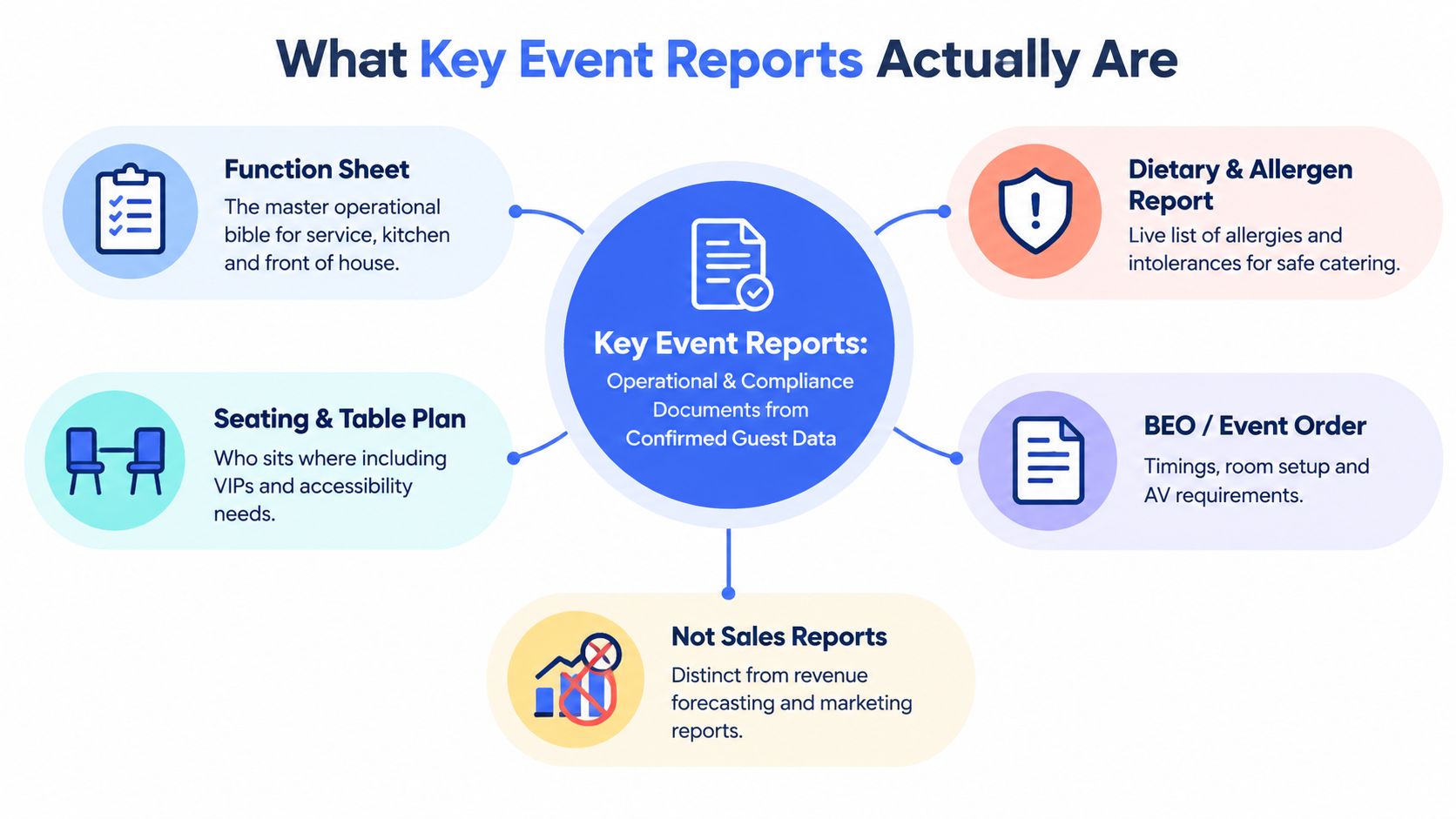
Key event reports are the operational and compliance documents created from confirmed event and guest data. They're different from sales or marketing reports, which examine enquiries, conversion, forecasting or channel performance. A key event report exists to help a named person prepare, deliver, check or close an event.
The reports normally appear after an enquiry has become a definite booking. They serve three practical audiences:
- Kitchen teams: Chef sheets, food pass sheets, pre-order summaries and dietary reports show what must be prepared and what must be checked before service.
- Front-of-house teams: Seating plans, place cards, table reports and run sheets show where guests go, what they've ordered and when each service moment occurs.
- Finance and administration: Deposit records, ticketing summaries and reconciliation reports show what was sold, paid, consumed or left outstanding.
The same term also covers post-event documents. A feedback summary, incident record or variance review can expose a recurring issue that wasn't visible during service. For venues that need a wider view of security incident documentation, this property manager guide by Overton Security provides useful context on recording incidents in a structured way.
The difference between a report and a printout
An ad-hoc printout might contain the right information today, but it rarely explains who amended it, when it was issued or which other documents need changing. A proper report has a defined structure, a version or issue time, a responsible owner and a distribution list.
That distinction matters when a guest changes from fish to vegetarian, moves table, adds a pre-ordered drink or cancels. In a controlled process, the change updates the operational record and the teams using it. In a manual process, someone must remember every file, email and printed copy that needs correcting.
The three questions every report should answer
Before adding a report to an event process, ask:
- Who uses it? The answer should be a role, such as Sous Chef, Floor Manager or Finance Controller.
- What failure does it prevent? A report that doesn't change a decision may be unnecessary.
- When is it locked or refreshed? Teams need to know whether they're reading a live planning view or the final service document.
A strong reporting set isn't about producing more pages. It's about giving the right person reliable information at the moment a decision is made.
The Essential Reports Every Venue Should Run
The most useful reports are tied to a failure point. A report should exist because somebody needs to act on it, not because the template has always been in the folder.
Guest list
The Guest List belongs to the Banqueting Manager, registration host and, where relevant, the Duty Manager or security lead. It prevents double-bookings, unplanned walk-ins and uncertainty at registration.
It should show the confirmed guest name, booking reference, attendance status, contact details where operationally necessary, table allocation and relevant access or hosting notes. Keep the information proportionate. A registration team may need names and arrival status, while the kitchen needs menu selections rather than every contact field.
Pre-order summary
The Pre-order Summary goes to the Head Chef, kitchen pass and Banqueting Manager. It prevents the late complaint that a guest was never offered a choice, while giving production a count by menu line.
The useful version is more than a total. It connects each selection to a guest, table and course, so the team can resolve a missing choice instead of discovering it during service. It should also identify guests who haven't responded, rather than treating them as having no preference.
Dietary and allergen report
The Dietary and Allergen Report is a vital working document for the Head Chef and Sous Chef. It prevents an allergen note from disappearing between the sales conversation, guest email and kitchen printout.
The Food Standards Agency allergen checklist explains that food businesses must provide allergen information and manage cross-contamination risks. The report should therefore link the guest, menu line, declared allergen, requested adaptation and service instruction. It should never rely on a free-text note alone.
Kitchen production sheet
The Chef Report translates orders into production. The Chef de Partie needs counts by course and preparation, while the Sous Chef needs exceptions, substitutions and timing notes. It prevents overproduction, underproduction and a pass team trying to interpret a sales spreadsheet during a busy service.
For a banquet, the sheet should distinguish plated meals, shared dishes, buffet items, children's portions and staff meals where relevant. It should also show the expected headcount and any unresolved selections so the kitchen can plan a controlled response.
Food pass sheet
The Food Pass Sheet is the bridge between production and service. The pass lead uses it to verify that plates leaving the kitchen match the table, course and dietary instruction.
A missing label, incorrect garnish, or unclear special plate is caught before reaching a guest. The sheet works best when it's arranged around service flow, not merely alphabetically by guest. Table, seat, course and dietary marker need to be visible without searching.
Seating and table report
The Seating and Table Report belongs to the Floor Manager and service captains. It prevents guests being directed to the wrong table, VIP details being missed and accessibility needs being separated from the information the floor uses.
A seating plan shows the visual layout. The table report adds the operational detail, including guest names, menu choices, pre-ordered drinks, place-card requirements and table-level notes. Those two views should be generated from the same allocation rather than maintained as separate versions.
Run sheet and order of the day
The Run Sheet is used by the Banqueting Manager, host, AV team and Duty Manager. It prevents a supplier arrival, speech, course, room change or technical cue being treated as someone else's responsibility.
Include arrival, room access, setup completion, briefing, reception, meal timings, speeches, entertainment, breaks, clear-down and escalation contacts. The sheet should make ownership obvious. “AV ready” is weaker than “AV lead confirms microphones and presentation playback before guest arrival”.
Financial reconciliation
The Financial Reconciliation Report belongs to the Finance Controller or events administrator. It prevents a lost deposit, duplicated charge or unexplained gap between the contract, ticketing record and final consumption.
Match deposits, final balances, amendments, refunds, upgrades, pre-paid drinks and any agreed extras against the booking. Finance shouldn't have to retype values that already exist in the event record.
Post-event feedback summary
The Post-Event Feedback Summary returns to the Events Manager and sales team. It prevents the same service failure appearing in the next enquiry because nobody recorded what happened.
Review guest comments alongside headcount variance, dietary incidents, timing delays, room changes and unresolved finance items. A useful review assigns an action and an owner. Feedback that sits in an inbox is not a report, it's an unclosed task.
| Report | Primary Owner | Distributed When | Failure It Prevents |
|---|---|---|---|
| Guest list | Banqueting Manager | Before registration and service | Double-bookings and uncertain arrivals |
| Pre-order summary | Head Chef | After guest responses and before production | Missing choices and incorrect quantities |
| Dietary and allergen report | Head Chef and Sous Chef | Before menu finalisation and service | Unsafe substitutions and missed declarations |
| Chef report | Kitchen lead | Before production briefing | Poor preparation and overproduction |
| Food pass sheet | Pass lead | At service briefing | Incorrect plates reaching tables |
| Seating and table report | Floor Manager | Before room setup and service | Mis-seating and missed guest notes |
| Run sheet | Banqueting Manager | Before team briefing and on the day | Missed cues, delays and unclear ownership |
| Financial reconciliation | Finance Controller | After amendments and close-out | Lost deposits and billing discrepancies |
| Post-event feedback summary | Events Manager | After feedback collection | Repeated operational mistakes |
Spreadsheets and Word Versus Purpose-Built Software
A manual process often starts with a spreadsheet for pre-orders, a Word document for the run sheet, an email chain for allergens and a PDF for seating. Each file may be familiar, but the workflow depends on someone copying information correctly and remembering which version is current.
The predictable symptoms are files named v4-final-revised, dietary tabs missed during copy and paste, and finance rekeying the same figures from an email into a ledger. A guest change late in the planning cycle creates a choice between checking every document manually or accepting that one team may work from old information.
Practical test: Change one guest's table and menu choice. If the team can't identify every affected document immediately, the reporting process has a version-control weakness.
Purpose-built hospitality software takes a different approach. It holds the booking, guest selections, dietary flags, seating and payment information in one record, then generates the chef sheet, food pass sheet, table report, BEO or run sheet from that record. The gain isn't just fewer clicks. It's the removal of repeated data entry and a clearer audit trail.
That approach still requires disciplined data capture. Software won't correct a guest who enters incomplete information or a team member who fails to resolve an exception. It does, however, make the relationship between the source record and operational documents visible.
| Factor | Spreadsheets and Word | Purpose-Built Software |
|---|---|---|
| Source data | Split across files and emails | Held in a central booking record |
| Guest changes | Manually copied to affected documents | Reflected in generated or refreshed reports |
| Allergen handling | Often dependent on separate tabs and notes | Captured against guest and menu information |
| Version control | File names and email timestamps | Defined report issue and current record |
| Finance | Re-keyed from multiple sources | Reconciled against booking and payment data |
| Distribution | Manual attachments and printing | Role-based views or controlled distribution |
Legal and Compliance Considerations in the UK
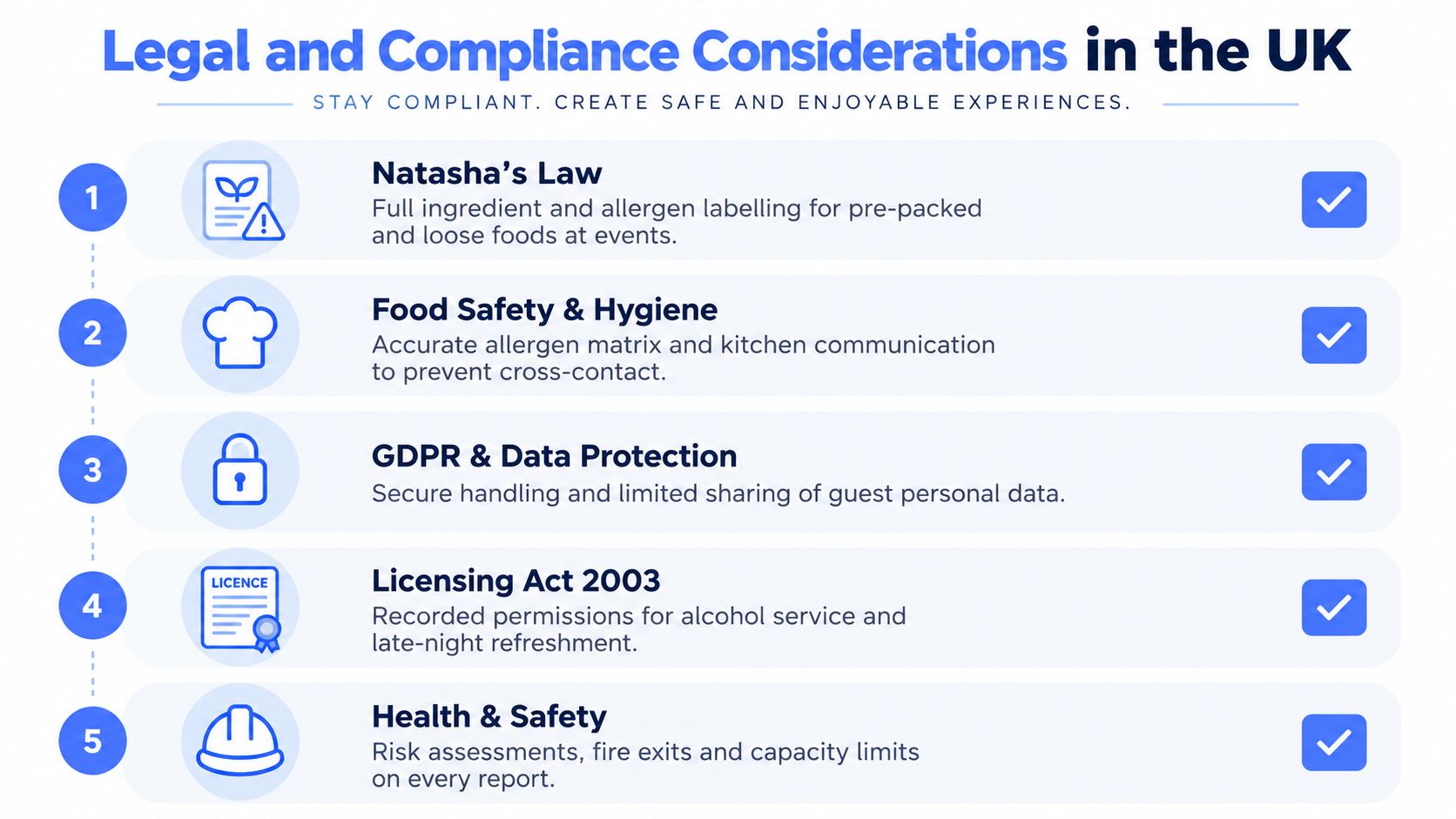
Reporting isn't just administration. It helps a venue demonstrate that it collected relevant information, communicated it to the right people and followed its documented process.
Food safety is the immediate concern. The Food Standards Agency guidance for food businesses says that non-prepacked food doesn't need a full ingredients list, but allergen information must be accurate and accessible to staff and guests. For prepacked for direct sale food, the rules changed on 1 October 2021, requiring the food name, a full ingredients list and emphasis of the 14 major allergens in that list, as described in the relevant UK food labelling guidance.
Allergen records need to follow the food
A venue's report should distinguish between a plated dish cooked for a guest, a buffet item, a pre-ordered item and a packaged product. UK hospitality guidance also supports communicating the 14 regulated allergens in written or oral form with clear signposting. A practical report can include those allergens plus custom dietary categories, but custom labels mustn't replace the statutory allergen record.
The event file should preserve the menu version, guest declaration, kitchen decision, substitution and service confirmation. That gives the Head Chef a working control and gives the venue a traceable record if an incident requires investigation. The 2025 catering guidance also highlights verifiable allergen information, signage, segregation, temperature logs and incident investigation.
Security and personal data
Venues within the scope of Martyn's Law must document public protection procedures and measures, assess how those measures reduce the risk of physical harm and terrorism-related vulnerability, and submit the required document to the regulator. The official Martyn's Law guidance distinguishes standard-tier and enhanced-tier obligations, so a run sheet and event file may need venue-specific crowd management assumptions, emergency procedures and scenario-based controls.
Guest names, seating plans and accessibility notes also require careful handling. Limit distribution to people who need the information, protect digital files, avoid leaving printed plans in public areas, and retain records according to the venue's documented policy. Licensing, fire risk assessments, capacity controls and insurance requirements should be reflected in the function file where they apply.
How Creventa Generates and Distributes These Reports
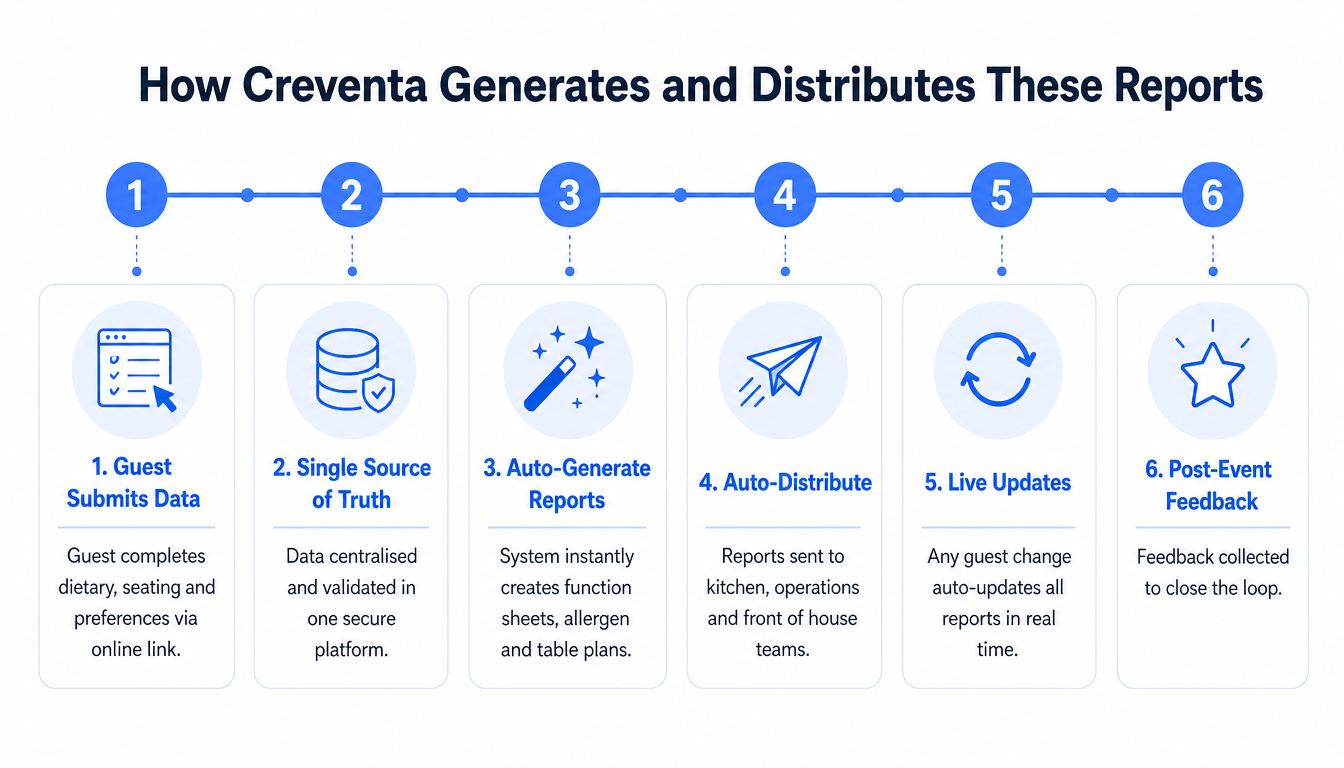
A connected reporting workflow begins before the event team prints anything. The guest receives a branded link, submits menu choices, dietary information and preferences, and those responses attach to the correct booking record. The events team can then review exceptions instead of transcribing every answer.
From that central record, Creventa can generate chef reports, front-of-house reports, food pass sheets, place cards, seating plans, function sheets, BEO documents and reconciliation information. Its allergen workflow tracks all 14 regulated allergens, alongside custom dietary categories, so the kitchen can see the declared requirement against the relevant menu choice.
One booking, several operational views
Take a wedding with 120 guests and 14 dietary requirements. The couple's organiser sends one pre-order invitation. Guests select their courses, declare dietary needs and provide any relevant seating information. The events coordinator reviews incomplete responses, confirms unusual requirements with the organiser and closes the response window.
The Head Chef receives a production view showing menu quantities and dietary exceptions. The Sous Chef receives the allergen summary. The Floor Manager uses the table report and place cards. The Banqueting Manager works from the run sheet and function sheet, while finance checks deposits, balances and paid extras against the booking.
The important point is that each role gets a useful view without maintaining a separate master spreadsheet. If a guest changes from one course to another, the event team can update the source record and regenerate the affected documents. The change still needs human review, particularly where an allergen or service instruction is involved, but the team isn't hunting through inboxes to find every copy.
Post-event feedback can remain connected to the same guest and booking history. That allows the Events Manager to review comments against operational notes, menu selections and service issues, then carry the learning into a future enquiry.
For venues assessing whether this model fits their workflow, Creventa provides a hospitality-focused platform covering pre-orders, allergens, seating, place cards, reports, enquiries, proposals, quotes, pre-event ordering and payment through its related products and workflows. Creventa was founded in June 2020 by Luke Ireland and Andrew Norton, and its public product information describes event support for functions ranging from 4 to more than 2,500 guests. Reported product figures include a 251% wet spend uplift from drink pre-orders at a Holiday Inn hotel, approximately 20% less food waste reported by a global hotel chain, more than 2 million festive dishes ordered through Creventa at Christmas 2025, and a 99.2% guest response rate to pre-order invitations. These are reported outcomes, not universal guarantees, so each operator should validate the workflow against its own service model.
Reporting Cadence, Templates and Metrics to Track
Reports become reliable when the team knows when to issue them and when to stop editing them. A practical cadence looks like this:
| Report | Cadence | Key Metric |
|---|---|---|
| Guest list and seating | Finalise at T-7 days | Final headcount variance |
| Chef and allergen sheets | Lock at T-48 hours | Allergen form completion |
| Run sheet | Print at T-12 hours | On-the-day change requests |
| Financial reconciliation | Complete at T+2 days | Reconciliation turnaround |
| Post-event feedback | Send at T+24 hours | Response and recurring issue review |
Use one template structure across weddings, corporate functions and private dining. Start with an event header containing date, room, organiser and issue time. Follow with guest and table details, dietary and allergen information, financial fields where relevant, then a sign-off line for the responsible role.
Track the process, not just the final revenue. Useful operational measures include pre-order capture above 90%, allergen form completion at 100%, final headcount variance below 5%, on-the-day seating change requests per event, and average reconciliation turnaround time. These thresholds are management targets, not verified industry benchmarks, so venues should adapt them to their own risk tolerance and operating model.
Common mistakes are easy to recognise:
- Skipping the review: Feedback that isn't discussed can't improve the next booking.
- Reusing old templates: A form built for one menu or room setup may carry dangerous assumptions into another event.
- Blaming variance on the planner: A recurring headcount or dietary variance usually signals a process problem, such as unclear deadlines or poor reminders.
- Measuring volume alone: More bookings don't show which event types are profitable or feasible when staffing and demand are volatile.
UK benchmarking reflects that mixed operating environment. MIA found 61% of businesses forecast higher revenue and 41% of expected 2025 revenue already confirmed, while ESSA found 46% expected higher revenue and 29% expected declines, as reported by Event Industry News. Reports should therefore show operational feasibility and margin contribution, not just occupancy.
Putting It All Together
The core report set covers the guest list, pre-order summary, dietary and allergen report, chef report, food pass sheet, seating and table report, run sheet, financial reconciliation and post-event feedback summary. Together, they connect the host, kitchen, floor, banqueting manager and finance team around one booking record.
Keep the rhythm simple. Finalise guest and seating information at T-7 days, lock chef and allergen information at T-48 hours, print the run sheet at T-12 hours, complete reconciliation at T+2 days and review feedback after collection. The exact timing can vary by event, but every report needs a defined owner and deadline.
Start by assigning a template to each report, naming its owner, agreeing role-based distribution lists, setting a review meeting and measuring the five core operating metrics monthly. Treat variance as a process signal, then adjust the guest communication, data capture or handover that caused it.
Creventa brings guest pre-orders, dietary and allergen tracking, seating, place cards, kitchen sheets, run sheets, payments and post-event feedback into a connected hospitality workflow. Visit Creventa to see how structured event reporting can replace scattered spreadsheets and Word documents with role-ready reports from one booking record.
Jake Crimmin, Hospitality Events Specialist, Creventa. Jake works with hotels and venues on event operations, focusing on how pre-orders and allergen data flow from the guest through to the kitchen.