A Tuesday morning in a hotel events office rarely starts with a clean pipeline. Enquiries sit in a shared inbox, follow-ups live in someone's notebook, deposits are checked against a spreadsheet, and the kitchen waits for a dietary report that may still reflect yesterday's guest list. The team isn't short of effort. It's short of one reliable place where sales, guest information, operations, and finance meet.
That's the buying problem behind event CRM for hotels and venues. You're not choosing software to store contacts. You're choosing how your team will capture demand, sell dates and spaces, collect guest decisions, protect guests with dietary requirements, prepare service documents, take payments, and reconcile the event afterwards.
The UK market makes this operational question commercially important. The events industry generated approximately £61.653 billion annually, including £16.3 billion from meetings and conferences, according to the UK Events Report 2024. A venue that still manages core event information through disconnected files is creating unnecessary friction inside a substantial revenue stream.
Table of Contents
- The Daily Reality Behind Event Sales at Hotels and Venues
- What an Event CRM for Hotels and Venues Is
- Core Features Every Venue Event CRM Should Cover
- End-to-End Workflows From Enquiry to Final Reconciliation
- Operational Advantages and Measurable ROI
- How Hospitality Event Platforms Compare With Spreadsheets and Generic CRMs
- Buyer and Implementation Checklist for Venue Event CRM
- Evaluating Vendors and Planning Your Next Step
The Daily Reality Behind Event Sales at Hotels and Venues
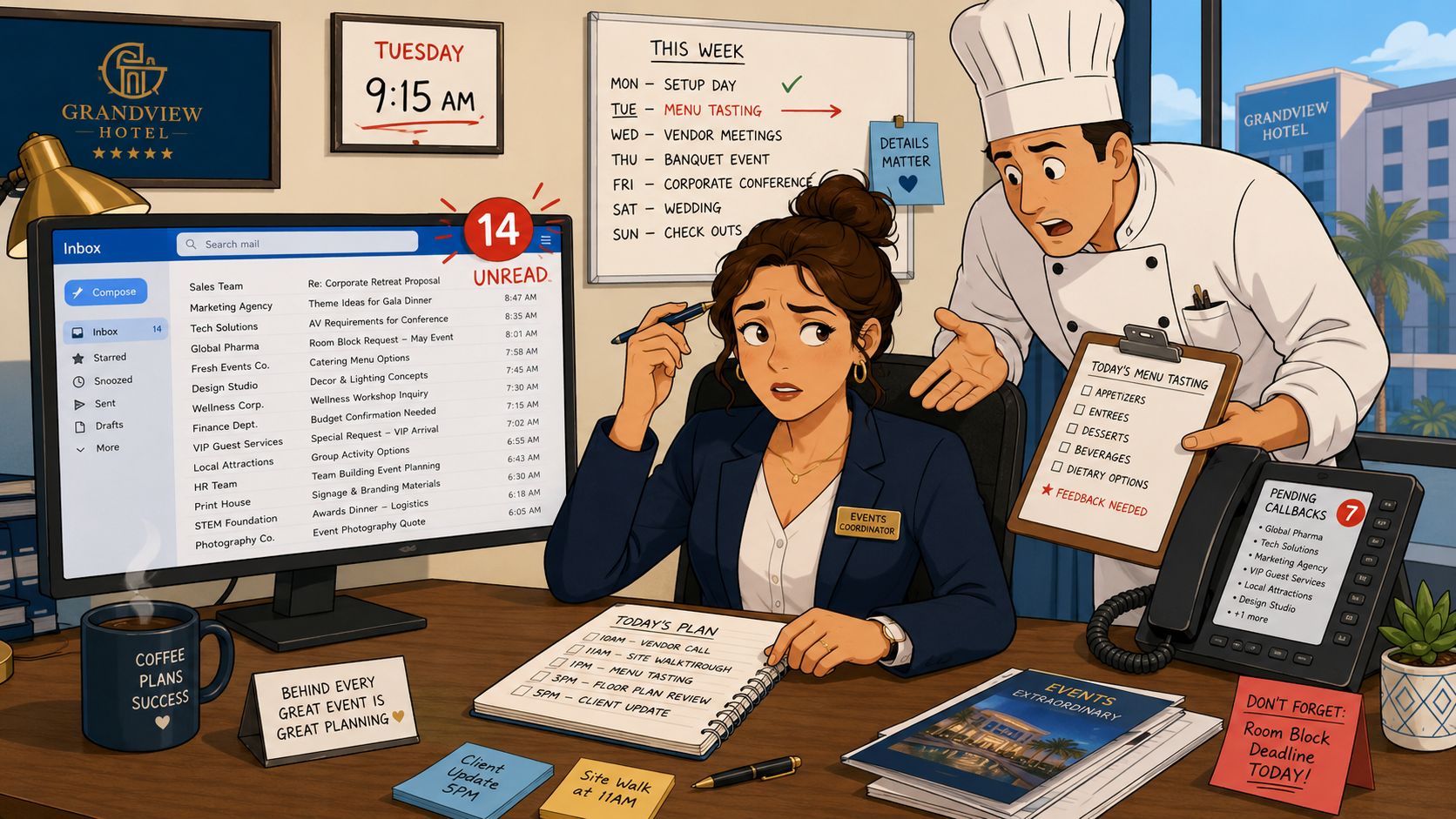
A hotel events coordinator can begin the morning with unread enquiry emails, callbacks from a wedding show, and a chef waiting for final allergen sheets for tomorrow's conference lunch. Finance needs confirmation of cleared deposits. Attendance has changed on group bookings, while a gala still carries an outdated floor plan.
The work then spreads across the PMS, shared inbox, deposit spreadsheet, and a generic CRM with little understanding of table plans. Guest details are entered repeatedly. Each amendment creates another reconciliation task, and every handover relies on someone forwarding the correct message.
Where the risk appears first
Commercial risk shows up in missed follow-ups, slow replies, provisional dates left unattended, and client history buried in old files. Operational risk follows when a menu selection, seating change, or dietary note fails to reach the kitchen and banqueting teams accurately.
The guide to reducing admin time for weddings and events at hotels highlights the practical cost of manual administration. It consumes coordinator time and creates more points where sales commitments, guest choices, payment status, and service instructions can separate.
Practical rule: If a change has to be typed into more than one system, treat it as a process defect, not a staff training problem.
An event CRM connects the event record across sales and service. It gives the coordinator, chef, banqueting manager, and finance team one current view of enquiries, pre-orders, allergens, seating, payments, and agreed instructions. The system supports judgement rather than replacing it, while integration with the PMS and payment process prevents another disconnected version of the booking.
What an Event CRM for Hotels and Venues Is
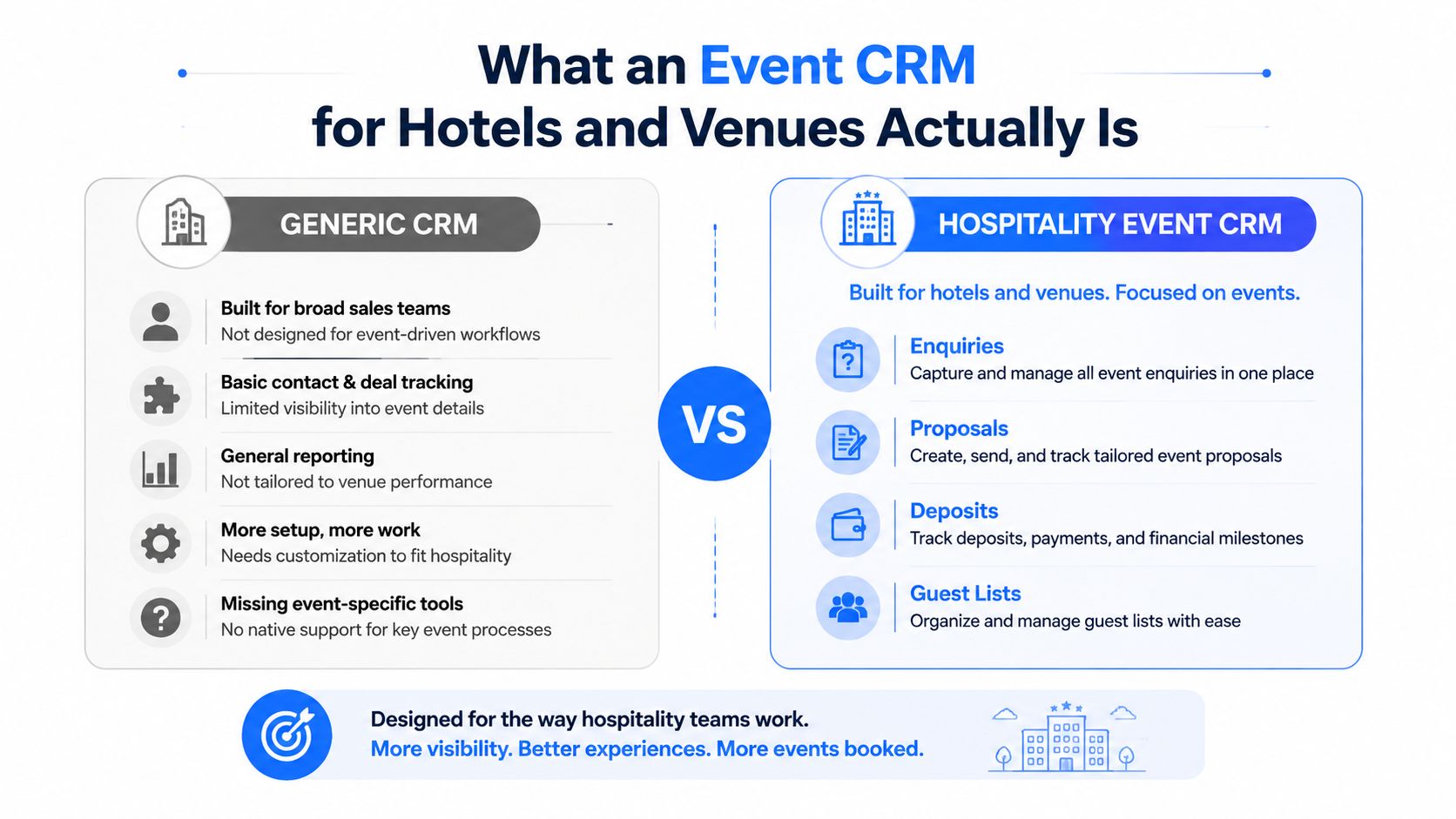
An event CRM for hotels and venues is the working record for group bookings and private events. It brings the enquiry, proposal, contract, deposit schedule, guest list, menu selections, seating plan, dietary information, communications, and final reporting into one event record.
Its value depends on hospitality detail. Generic CRMs track contacts and pipeline stages but do not natively support table assignments, dietary requirements, guest-level pre-orders, or kitchen-facing service documents. Those details shape the guest experience and must remain connected to the commercial record.
A property management system should remain the source for bedrooms, check-in, room availability, and room revenue. The event CRM should manage non-room revenue and group-function detail for meetings, weddings, dinners, celebrations, and other venue events. Connect both systems so the client, booking, and payment status stay aligned.
A booking widget covers a narrower task. It may capture a name and preferred date, while the event CRM carries the work that follows, including proposals, deposits, guest-level pre-orders, seating, kitchen documents, and post-event reconciliation. Integration with the PMS and payment process belongs in the buying requirements from day one.
Creventa's event management platform illustrates this hospitality-specific model, with event information structured around pre-orders, allergens, seating, place cards, and reports. Its product set includes the core platform, CreventaFlow for enquiries, proposals, and quotes, Prinq for guest ordering and payment before events, plus post-event feedback and guest insights.
Test the event record
Ask each vendor to show one change moving through the system. Change the guest count, move a table, update a dietary requirement, alter a payment status, and generate the documents used by the kitchen and service team. Exporting a file, editing it elsewhere, or re-entering information signals a disconnected workflow.
The right system gives sales a current opportunity, the kitchen a usable service view, banqueting a current plan, and finance a clear path from deposit to final balance. Use that test before judging dashboards, custom fields, or presentation polish.
Core Features Every Venue Event CRM Should Cover
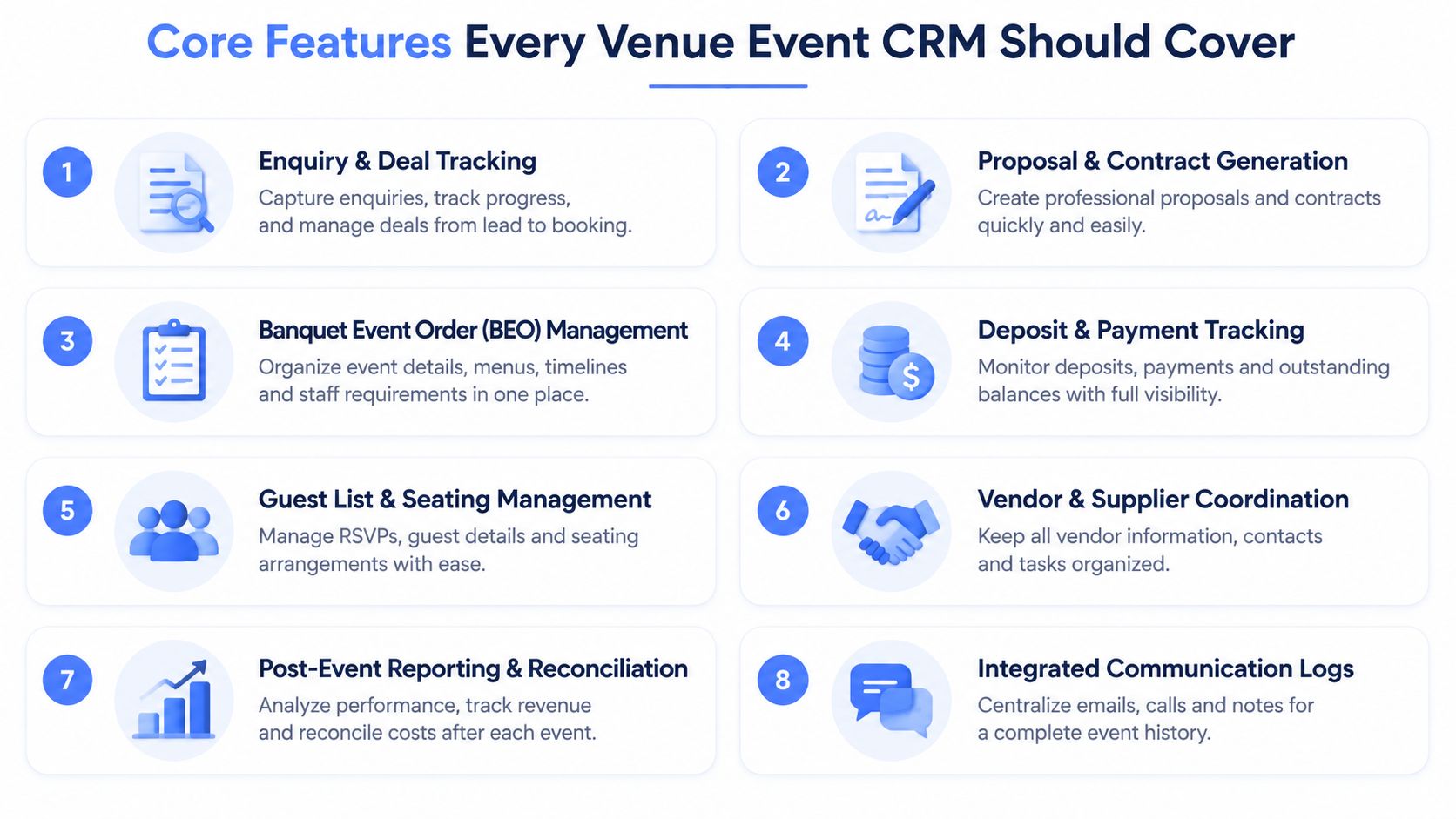
Start with the handoffs that slow venue teams down. An event CRM should connect the work from enquiry through payment, guest service, and reconciliation, with each record carrying the details required by sales, banqueting, kitchen, and finance. Focus on whether each area removes delay, duplication, or error in a hospitality workflow.
Enquiry and deal tracking
Web forms, email, phone enquiries, and other agreed channels should enter one structured pipeline. The team needs the event date, space, estimated value, client, next action, source, and reason for loss in one view. Repeat corporate clients should retain their booking history, so a new conversation starts with useful context.
CreventaFlow supports enquiries and event sales through provisional dates, follow-ups, proposals, quotes, and conversion reporting. Test whether those details stay connected after the booking moves from sales into operations.
Proposals and contracts
Branded proposals and quotes should pull through the correct event details, spaces, packages, prices, terms, and payment schedule. A guest-count change or drinks-package addition should update the working document without forcing the coordinator to rebuild it.
Electronic approval has value when the accepted proposal becomes the operational booking record. If staff must copy the information into another document, the handoff remains a source of risk.
Banquet event order management
A BEO or function sheet should hold timings, room set-up, food and drink, AV, service notes, guest numbers, and responsibilities. Keep it editable as plans develop, while retaining enough history for teams to see what changed and when.
Deposits and payment tracking
Show what was requested, what has cleared, what remains due, and which reminders were sent. Payment integrations can support this process, but the test must include refunds, partial payments, failed payments, and reconciliation. A payment status that cannot be trusted will create work for both the coordinator and finance team.
Guest lists and seating
Guest-level records should connect names to tables, courses, drinks, tickets, dietary requirements, and other relevant notes. A drag-and-drop seating plan helps only when table changes update the guest list and service documents as well.
Vendor and supplier coordination
For complex events, link suppliers to the correct function and record delivery details, access requirements, equipment, and ownership. A general contact database is insufficient if the operational connection disappears.
Post-event reporting and reconciliation
Reports should answer separate questions for sales, operations, and finance. Sales needs pipeline pace, conversion, lost reasons, and repeat-client history. Operations needs final counts and service documents. Finance needs deposits, balances, and event revenue that can be reconciled with the PMS and payment process.
Integrated communication logs
Emails, reminders, confirmations, tasks, and post-event feedback should sit against the event and client record. That continuity matters when a coordinator is away, and it gives managers a reliable view of follow-up quality.
Review the Creventa features overview as a checklist, then test each workflow against your own meetings, weddings, and other event types. Feature labels are only useful when the underlying record updates the teams that act on it.
End-to-End Workflows From Enquiry to Final Reconciliation
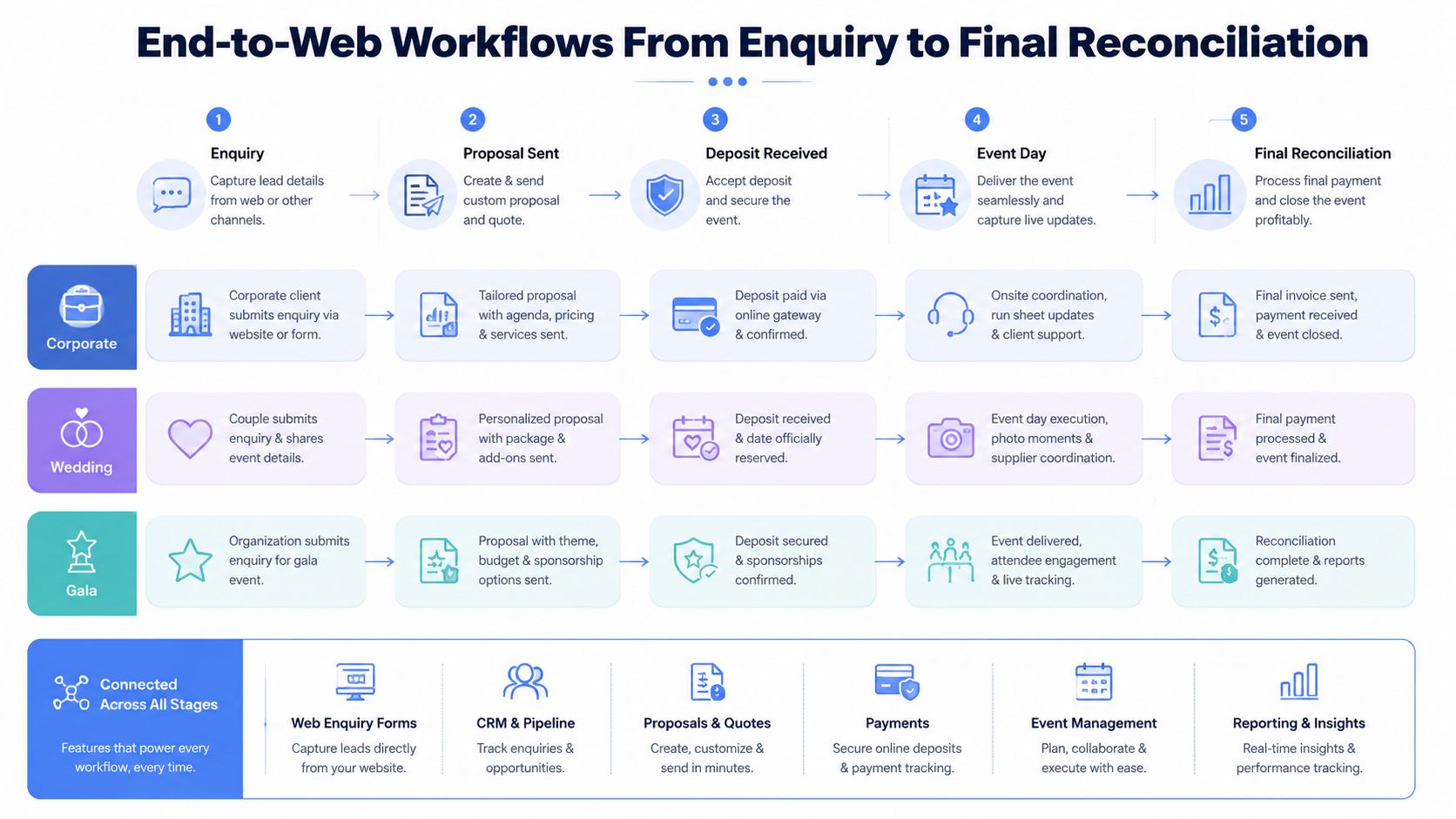
A late change to a menu, table, or payment can expose a weak handoff. The event CRM must carry operational details from the first enquiry through PMS or payment reconciliation, so sales, kitchen, banqueting, and finance work from the same record.
Corporate meeting
The coordinator captures the requested date, delegate range, room preference, catering requirement, and client account from the website enquiry. The proposal, date hold, and follow-up history stay attached to that opportunity.
After confirmation, the booking starts guest communications and, where needed, pre-order collection. The final record then feeds the function sheet and kitchen information, while showing payment status for finance. Reconcile the remaining balance through the relevant PMS or accounts process before closing the event.
Wedding reception
Use the booking record to make each decision explicit:
- If the guest list is still changing, keep named guests and table assignments current.
- If a guest selects a menu or reports a dietary need, attach the choice and allergen information to that person, not to an unstructured note.
- If a table or course changes, update the floor plan and function documents used by banqueting.
- If service is complete, retain the final guest count, extras, payments, and feedback against the original booking.
That structure gives the banquet team one current version of the event, rather than separate seating and menu files.
Ticketed gala
A ticketed gala creates a different control problem. Sponsors may hold reserved places, guests may pay individually, and teams still need a dependable view of attendance, table assignments, menu choices, and outstanding balances.
Without a connected record, staff compare a ticket report with a seating file and a payment export. That creates avoidable reconciliation work and leaves room for mismatched totals. Set up the CRM so place allocation connects to registration, check-in, and final finance review. The gala is ready to close when sales, kitchen, banqueting, and finance can use the same final event record.
Operational Advantages and Measurable ROI
The business case should begin with the work your team can observe. Count the time spent copying enquiry details, preparing proposals, chasing deposits, consolidating menu choices, correcting seating documents, and rebuilding reports. Then attach the internal cost of that work.
Pre-orders are a direct operational lever. Creventa customer reporting includes a 251% wet spend uplift from drink pre-orders, reported by a Holiday Inn hotel, and approximately 20% less food waste, reported by a global hotel chain. These figures are customer-reported outcomes, not guarantees, so use them as questions for a vendor, not as a forecast for your own venue.
The wider waste problem is material. UK hospitality and food service food waste was estimated at £2.5 billion in 2011, rising to £3.0 billion in a later estimate, according to the WRAP report on waste in the UK hospitality and food service sector. Better pre-order visibility can help a venue target overproduction, but the result depends on menu design, purchasing, attendance accuracy, and kitchen discipline.
Typical ROI levers from a venue event CRM
| Lever | Operational signal | Typical impact |
|---|---|---|
| Enquiry handling | Fewer missed follow-ups and faster proposal preparation | More consistent sales coverage |
| Pre-orders | Clearer demand by guest and menu item | Better purchasing and production decisions |
| Dietary workflow | Named guest requirements reach kitchen and service documents | Lower handoff and compliance risk |
| Payment tracking | Deposits and balances appear against the event record | Less manual chasing and reconciliation |
| Reporting | Lost reasons, sources, pace, and repeat history are visible | Better allocation of sales effort |
| Handover control | Sales, operations, and finance use current event data | Fewer avoidable corrections |
For UK venues, allergen handling is also a risk-control issue. The Food Standards Agency checklist for food businesses requires accurate allergen information for the 14 regulated allergens, while the FSA guidance on allergen information explains that information for non-prepacked food at events can be provided in writing or verbally when a clear sign directs customers how to ask.
Use this calculation:
(hours saved × hourly employment cost) + waste reduction + incremental contribution from converted bookings, compared with annual licence and implementation spend.
Do not put a speculative conversion percentage into the model. Use your own enquiry volume, response workload, waste records, and lost-booking reasons.
How Hospitality Event Platforms Compare With Spreadsheets and Generic CRMs
There are four common approaches. None is automatically right, but each creates a different operational trade-off.
Spreadsheets and email are cheap to start with and familiar to everyone. They fail when several people edit the same booking, when follow-ups aren't assigned, or when guest choices need to become kitchen-ready documents. A generic CRM improves contact and pipeline visibility, but often forces hospitality teams to represent spaces, menus, tables, dietary tags, and service documents through custom fields or attachments.
A purpose-built hospitality platform should sit between those options and a bespoke build. It can be implemented faster than a custom system, while matching the workflow objects that hotel and venue teams use. Bespoke software offers control, but the venue owns more of the product decisions, testing, maintenance, and integration burden.
| Approach | Hospitality fit | Integration readiness | Typical total cost |
|---|---|---|---|
| Spreadsheets and email | Low once events involve multiple handoffs | Manual exports and re-keying | Low licence cost, high staff administration |
| Generic CRM | Moderate for sales, weaker for service detail | Depends on configuration and APIs | Licence plus customisation and workarounds |
| Hospitality event platform | Designed around enquiries, functions, guests, and service workflows | Built around PMS and payment connections | Subscription and implementation cost |
| Bespoke build | Can match a specific process closely | Requires ongoing technical ownership | Higher build, maintenance, and change cost |
The right comparison is not “how many features does this platform have?” It's “how many manual reconciliations remain after implementation?” Review Creventa compared with spreadsheets with that question in mind.
The trade-off that hurts on day one
Bespoke software can be flexible but slow to deliver. Off-the-shelf software can go live quickly, but only if its core workflows match how your team sells and serves events. A hospitality platform that typically goes live in days, not weeks may reduce implementation disruption, but you still need clean data, clear ownership, and staff training.
Creventa was founded in June 2020 by Luke Ireland and Andrew Norton. If you assess it, assess the same things you should assess in any vendor: workflow fit, integration depth, support, data ownership, pricing, and exit terms.
Buyer and Implementation Checklist for Venue Event CRM
A polished demo proves very little. Procurement should test whether the system can survive your real booking calendar, your current data, and the awkward changes that happen in the week before an event.
Data and workflow readiness
Ask the vendor to map your historical enquiries, contacts, contracts, booking history, guest records, and relevant dietary information. Decide what should migrate, what should be archived, and who approves the final data set. UK GDPR requires data minimisation, purpose limitation, storage limitation, and a lawful basis for processing, while electronic marketing under PECR requires proper consent, as outlined in GDPR guidance for event organisers.
Separate operational guest data from marketing data. A guest's dietary requirement may be needed to fulfil the event, but that doesn't automatically give the venue permission to use the information for marketing.
Integrations and resilience
Put every integration in writing. Confirm the scope for PMS, payment gateways, accounting exports, email, and reporting. Creventa integrations may include Delphi, Opera Cloud, SevenRooms, OpenTable, Guestline and RezLynx, Stripe, Adyen, and PlanetPay, but your contract should specify what each connection synchronises and what remains manual.
Ask what happens during PMS downtime, payment failure, duplicate records, or a rejected transaction. A system that works only when every connected service is available hasn't been tested properly.
Commercial and security checks
Check role-based access, audit history, data residency, retention controls, PCI responsibilities, support response, service levels, and contract renewal terms. Ask who owns the data on exit, how custom fields are exported, and whether configuration changes require paid professional services.
Pricing transparency matters more than the headline licence. Review the event software switching checklist before signing, and include migration, training, integrations, support, reporting, and exit work in the total-cost calculation.
Go-live discipline
Choose one event type for the first rollout. Train sales, kitchen, banqueting, and finance against the same test booking, then rehearse a late guest change, a seating change, an allergen update, and a failed payment. Creventa pricing is published publicly and transparently, but every shortlisted vendor should provide an equally clear view of recurring and implementation costs.
Evaluating Vendors and Planning Your Next Step
Start with a shared scenario script, not a feature checklist. Give each vendor the same corporate meeting, wedding, and ticketed gala examples. Ask them to show the journey from first enquiry through proposal, deposit, guest communication, pre-order, seating, kitchen handoff, service documents, payment reconciliation, and post-event reporting.
Request references from venues with comparable event complexity. Don't ask whether users “like the system”. Ask how the venue handles late changes, staff absence, PMS outages, dietary updates, payment exceptions, and data exports.
A paid pilot on one event type is a sensible next step. Define success in operational terms:
- Sales control: Can a coordinator see every open enquiry, next action, provisional date, and lost reason?
- Proposal speed: Can the team update a branded quote without rebuilding the document?
- Guest execution: Does a menu or dietary change reach the correct kitchen and service outputs?
- Seating accuracy: Does moving a guest update the relevant plan and reports?
- Finance visibility: Can finance identify deposits, balances, refunds, and final reconciliation?
- Relationship value: Can sales see repeat corporate bookings, preferences, and booking history?
- Exit protection: Can the venue export its contacts, events, documents, and operational history in a usable format?
Treat vendor selection as a workflow-fit decision, not a feature-count exercise. Integration depth, support responsiveness, implementation effort, and exit terms can matter more than an impressive demo dashboard.
If your current process depends on spreadsheets, shared inboxes, and repeated data entry, document the failure points for the next working week. Then invite vendors to solve those exact points, starting with enquiry management and ending with the kitchen and finance handoffs.
Creventa combines hospitality event sales and operational workflows, including CreventaFlow for enquiries, proposals, and quotes, with pre-orders, allergens, seating, payments, documents, and reporting in the wider platform. Visit Creventa to assess whether its event CRM approach fits your hotel or venue workflows.
Andrew Norton, Founder, Creventa. Andrew founded Creventa after years working with hospitality venues on the admin gap between a confirmed booking and event day.