December is the month that tells you whether your pub is running a proper party operation or just coping with chaos. UK pub demand peaks hard in December, with trading volume estimated at 95% versus an annual average of 78%, then falls to 55% in January. Around 80% of pub sales happen before 9pm, with the sharpest peak between 6pm and 8pm HMRA demand calendar. That is exactly why party booking software for pubs is not a nice-to-have. It is the system that decides whether your pre-evening rush turns into margin or into missed calls, messy deposits, and kitchen confusion.
Table of Contents
- Why Party Bookings Deserve Their Own Software in a Pub
- Where Pub Bookings Live Today and What's Going Wrong
- Must-Have Features for Party Booking Software for Pubs
- A Pub Manager's Evaluation Checklist
- What the Numbers Look Like in a Real Pub
- Rolling Out Party Booking Software in Your Pub
- Pricing, Negotiation and Your First 30 Days
Why Party Bookings Deserve Their Own Software in a Pub
Old pub admin breaks fast when a party booking lands. A few emails, a spreadsheet, and one person chasing deposits cannot keep up once party bookings, walk-ins, and New Year's Eve demand all hit the same day. If the booking process cannot absorb that pressure, it is already wasting trading capacity UK Hospitality pub bookings source.
The pressure points licensees ignore
Pre-orders come first. Group parties need menu choices captured early and passed cleanly to the kitchen, because a vague inbox note slows service and creates mistakes.
Allergen handling is the next failure point. Pub managers need a traceable flow from guest choice to kitchen output and service records, not a scribbled table note that disappears before prep starts. Deposits and no-shows matter just as much, because that is where party margin leaks away before the first pint is poured.
The booking mix also has to suit different guests at the same time. In Britain, a survey of 5,000 consumers found 27% like to pre-book a table while 73% prefer spontaneity UK Hospitality pub bookings source. Pub booking software has to support both habits in one venue, with a clear path for planned parties and enough flexibility for walk-ins. That is how real pubs trade.
Practical rule: if your party process needs two inboxes, one spreadsheet, and a walk to the kitchen to make sense, it's already too slow for December.
Where Pub Bookings Live Today and What's Going Wrong
The best way to judge a booking setup is to ask how it behaves under pressure. December is not the same as a Tuesday in February, and a pub does not trade like a conference centre. A pub needs deposits, quick table reshuffles, kitchen timing, and reporting that separates party revenue from normal covers.
Booking setup comparison for pubs
| Setup | Deposit Capture | Allergen Traceability | Pre-order Sync | Table Plan | Reporting |
|---|---|---|---|---|---|
| Shared spreadsheets | Weak, usually manual chasing | Poor, notes get lost | Weak, kitchen rekeying needed | Limited, hard to update live | Thin, hard to trust |
| Generic event tools | Better than spreadsheets, but clunky for pubs | Mixed, often too generic | Inconsistent, extra admin | Adequate for static layouts | Usually broad, not pub-specific |
| Bespoke builds | Can be strong if maintained | Depends on how it was built | Can work, but costly to keep aligned | Can be flexible | Often good, but only if reporting was specified well |
| Hospitality-built systems | Strong, rule-based deposits and reminders | Better traceability across the guest journey | Designed for kitchen handover | Built for live seating changes | Clearer operational reporting |
If you want a useful reference point on how service providers structure reservation workflows, the CallZent reservation service providers page is worth a quick look, because it shows the broader shape of what venues are often trying to manage.
The hard truth is that spreadsheets fail under December load because they don't enforce rules. They don't block a table until a deposit lands, they don't nudge staff when allergens are missing, and they don't tell the kitchen what changed. Bespoke builds can solve those issues, but they usually pull money and time away from the pub team unless they're tightly maintained.
Generic event tools are the other dead end. They're often built around weddings, conferences, or formal events, so they miss pub rhythm. A pub has Sunday roasts, quiz nights, birthday bookings, late walk-ins, and last-minute room splits. Hospitality-built platforms pull ahead because they're designed for those messy realities, not just tidy event rooms.
Must-Have Features for Party Booking Software for Pubs
A pub manager should judge party booking software by one question, does it hold up on a Friday night. The difference between a system that helps and one that just looks tidy is whether the kitchen, the floor, and the duty manager all see the same live information.
Start with the features that protect trading
Pre-orders come first. If a Friday quiz-night menu is going out, the system should collect choices early and turn them into kitchen counts that staff can use. A practical way to collect guest choices is covered in this guide on collecting food and drink pre-orders for events. If you are still exporting names and copying them into a prep sheet, you are only shifting the admin around.
Seating plans matter just as much. A 40-cover birthday in a pub with two knocked-through rooms needs drag-and-drop table control, not a rigid floor map that falls apart when one group arrives early. Good software lets staff move the booking, split it, and keep the notes attached.
Allergen tracking has to reach the kitchen, not sit in a PDF nobody opens during service. Government guidance is clear that UK food businesses should give allergen information for each buffet item separately, not for the buffet as a whole, and they can do that with dish labels or a sign telling guests to ask staff GOV.UK allergen guidance. That means the booking form needs dish-level capture for buffets, canapés, and shared menus, then it needs to print cleanly at the pass.
Payments need more than a basic deposit button. For pub parties, the system should support split deposits, partial refunds, and card-on-file so changes do not force you to start again. Large bookings need rule-based handling, not polite reminders that get ignored.
Ticketing helps with charity nights, sports screenings, and ticketed Sunday lunches where entry control matters as much as seating. Add SMS reminders if no-shows keep hurting you, because reminders are one of the simplest ways to keep guests on track.
Required features: pre-orders, seating, allergen capture, and deposits.
Useful extras: CRM tagging, SMS reminders, and tighter POS syncing.
One more point matters for busy pubs with bespoke systems. Bespoke builds can solve those issues, but they demand ongoing investment that pulls resources away from the pub team unless they are tightly maintained.
Hospitality-built platforms usually handle pub workflow better because they are built for Sunday roasts, quiz nights, birthday bookings, late walk-ins, and last-minute room splits. Generic event tools are often shaped around weddings, conferences, or formal events, so they miss the pace and mess of a pub service.
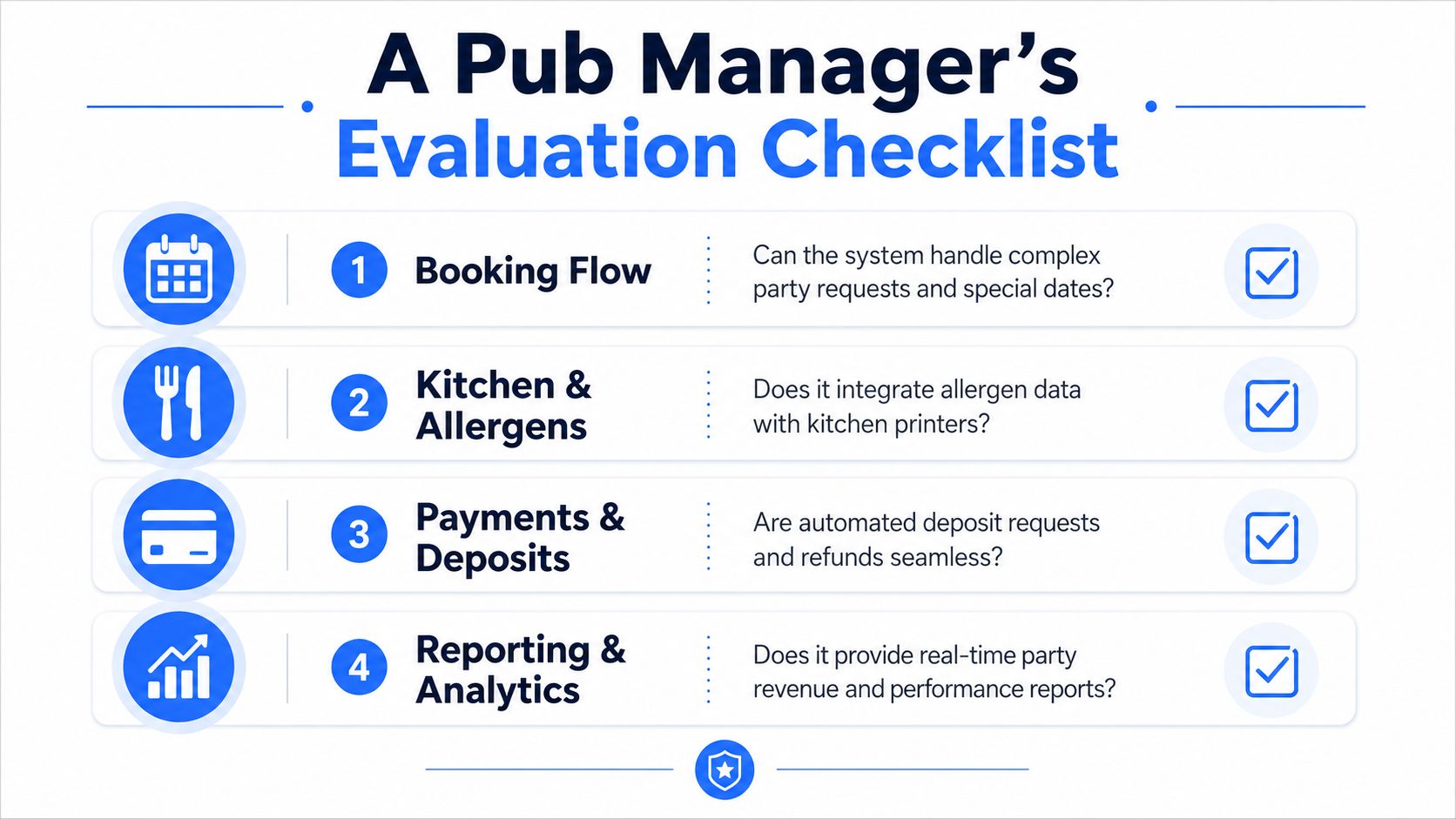
A Pub Manager's Evaluation Checklist
Run every demo against live pub problems, not sales language. If a vendor cannot show the flow in half an hour, it will not save your team on a busy Saturday.
Booking flow
Ask whether the system can hold a long table until a deposit clears. Ask what happens if two people try to book the same slot at once. Ask whether a shift manager can override capacity on a Saturday without wrecking the record.
Kitchen and allergen handling
Make them show you, live, whether allergen data lands in the kitchen printer in plain English. Check whether guest notes stay attached to each dish, not just the overall booking. If a system cannot separate menu choices from service notes, it is not ready for parties.
Payments and deposits
Test whether deposits can be chased automatically and refunded cleanly if the booking changes. A good pub system should reduce friction, not create a payment admin job. If you need a separate workaround for every large booking, the payment flow is too weak. For pubs comparing group ordering options, pub pre-order software alternatives are worth reviewing before you sign anything.
Reporting and integrations
Ask for one report that separates party revenue from walk-in covers. Then check whether the system connects cleanly with your EPOS and rota process, because a booking that nobody can staff or ring through the till is only half a booking. For a useful checklist on replacing your current setup, the switching event software checklist is a practical companion.
If you need a refresher on alcohol responsibilities alongside party service, alcohol service training with TP Training keeps the standards front of mind. Score each vendor against your own priorities, not theirs. A strong fit on booking flow is useless if the kitchen still gets messy tickets and the manager still has to chase deposits manually.
What the Numbers Look Like in a Real Pub
A mid-sized pub doesn't need fantasy maths. It needs a simple model that shows whether software replaces admin work and protects spend. For a venue doing roughly 220 covers a day across food and drink, the key question is whether party bookings create smoother turns, cleaner pre-orders, and fewer no-shows.
Party booking ROI for a mid-sized UK pub
| Metric | Before software | After 6 months | Annual uplift |
|---|---|---|---|
| Party booking admin | Manual chasing, fragmented notes | Centralised workflow | Less manager time spent on booking admin |
| Pre-order handling | Late or incomplete | Collected earlier and sent to kitchen | Cleaner prep and fewer service delays |
| No-show control | Deposits handled inconsistently | Deposits and reminders built in | Better protected revenue |
| Table turn friction | More delays between bookings | Faster handover and seating changes | Smoother weekend trading |
| Reporting | Party and walk-in numbers mixed | Clearer event reporting | Better decisions for future dates |
That table is the right way to think about returns. The gain is not just more revenue, it's less friction between the booking desk and the kitchen. When the pre-order process is organised, the team spends less time translating guest messages and more time trading.
Use this cost calculator for food if you want to sanity-check margin on group menus and shared platters. That matters because Christmas party concentration and midweek private-hire demand can swing the result hard. If your pub's party business is heavy in December, software does more work. If your group bookings are sparse, the main win is admin reduction, not dramatic sales growth.
Rule of thumb: if a system doesn't cut admin and protect deposits, the payback story is weak even if the feature list looks impressive.
Rolling Out Party Booking Software in Your Pub
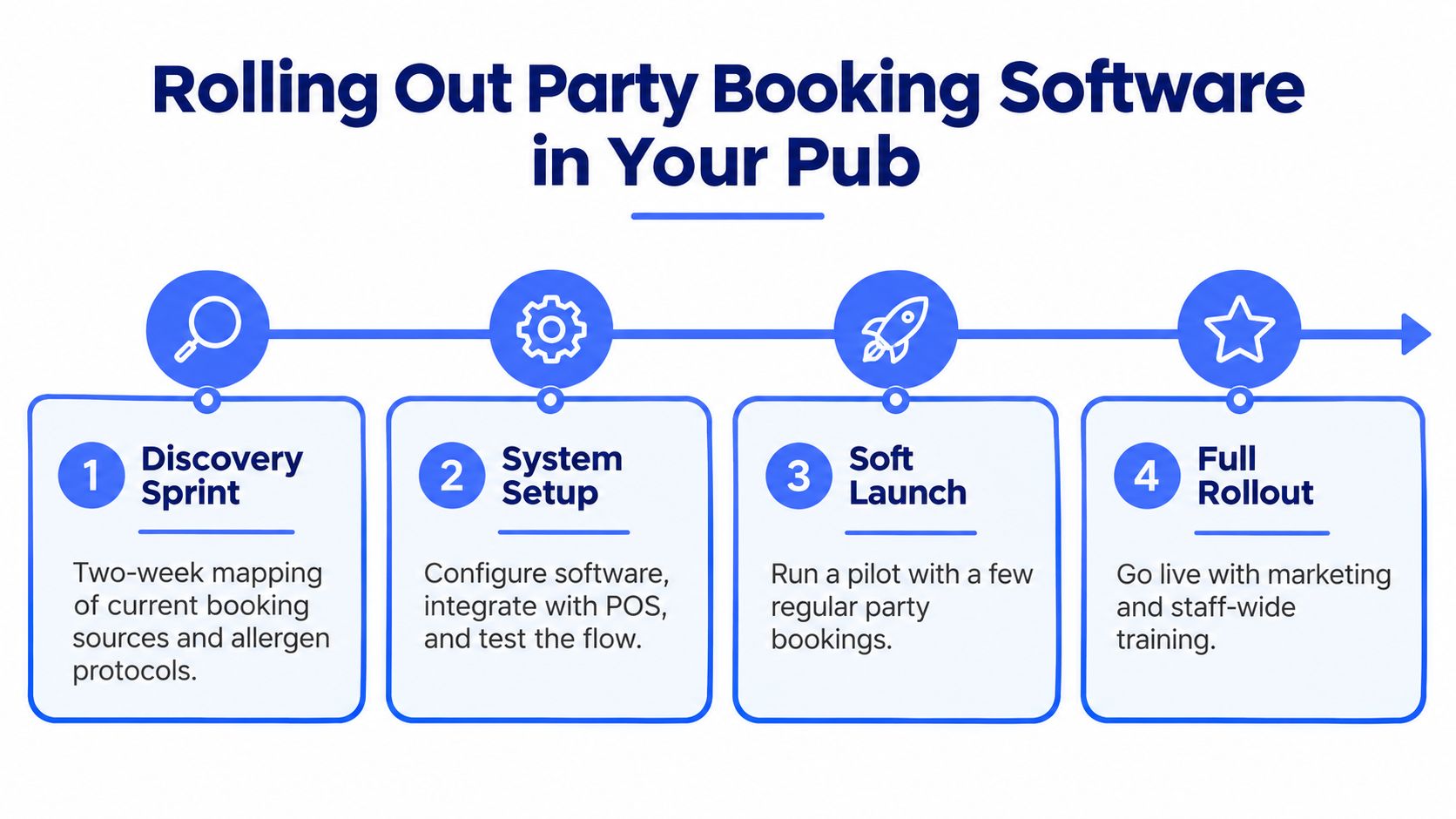
Rollout fails when teams try to “go live” before they've mapped the actual pub process. Start with what your venue already does, then force the software to match the way your staff, kitchen, and supervisors work on busy nights.
Discovery sprint first
Spend two weeks mapping booking sources, deposit rules, allergen handling, and the handoff into EPOS and rota planning. If the current process lives across email, paper, and one person's memory, write it down before you change anything. That is the only way to avoid rebuilding the same mess in a new system.
Build around real covers
Give yourself four weeks to configure party types, capacity rules, pre-order menus, and deposit logic. Kitchen staff should validate the ticket print format on actual covers, not sample data, because the first bad print usually shows up on a busy service. If you host whiskey-led events or tasting nights, these new whiskey host tips are a handy reminder that the menu and the guest journey need to match the occasion.
Soft launch before you trust it
Run a soft launch on weekday parties only, then expand to weekends once deposit failures and double-bookings are under control. Train staff by role, not all at once. The duty manager needs different controls from the bar team, and the kitchen needs different output from front-of-house.
For a useful checklist before a software change, the switching event software checklist can help you pressure-test the handover. If you're working through entertainment-led booking ideas as well, it helps to keep the same discipline you'd use for any private event. The pub still has to trade, even when the theme changes.
Pricing, Negotiation and Your First 30 Days
Price the system against the admin it removes, not against the cheapest monthly sticker. For single-site pub operators, realistic software costs often sit in the £40 to £120 per month range, while multi-site groups are more likely to land in the £150 to £400 range. The monthly number is only the start. Per-booking card fees, SMS charges, premium support tiers, and onboarding day rates are the items that get hidden in demos.
Typical UK pub party booking software pricing bands
| Tier | Monthly Cost (GBP) | Best For | Usually Includes |
|---|---|---|---|
| Entry | £40 to £120 | Single-site pubs | Core booking flow, basic reminders, simple reporting |
| Group | £150 to £400 | Multi-site operators | Multi-site controls, deeper reporting, stronger support |
Push hard on the commercial terms. Ask for onboarding to be waived in exchange for a 12-month commitment if the vendor wants the deal. Ask for a seasonal pause clause for January and February if your pub slows after Christmas. Insist on a written API rate-limit figure so future integrations don't get throttled when you expand.
Red flag: per-cover commission. It looks small in a demo, then eats margin on large Christmas party bookings.
If a provider buries card fees or SMS charges until contract review, assume the price is higher than the headline. Ask whether the reporting is included or locked behind a premium tier. Ask whether support is local, reactive, or just a ticket queue that slows down when your busiest dates hit.
For a public pricing reference point, see Creventa's published pricing. Creventa's pricing is public and transparent, which is the standard I'd expect from any vendor that wants to work with pubs seriously.
Start the first 30 days like this. Week one, shortlist and book demos. Week two, run reference calls and set up a trial. Week three, review the contract with your deposit, support, and API questions attached. Week four, train the team, then go live with a soft event before you open the weekend diary fully. If you do that, you're not waiting for a “perfect” launch, you're building a working one.
If you want a system that handles pre-orders, seating, allergens, payments, and event reporting in one place, Creventa is built for that hospitality workflow. It's a practical fit for pubs that need to stop losing time to spreadsheets and start treating party bookings like revenue, not admin. Visit Creventa and see whether it matches the way your venue trades.
Jake Crimmin, Hospitality Events Specialist, Creventa. Jake works with hotels and venues on event operations, focusing on how pre-orders and allergen data flow from the guest through to the kitchen.