The bookings are confirmed, the deposits are paid, and the kitchen has already started planning menus. Then someone decides the venue needs new event pre-order software before the next busy season. At that point, switching isn't a simple import exercise. It's a live operational change involving guest promises, payment records, dietary information, staff routines, and public booking links.
For a venue team, the primary question isn't whether the new platform can hold yesterday's data. It's whether guests can still book, pay, receive reminders, and trust the information held about their event while the old system is being replaced. This is how to switch event pre-order software without losing bookings, by treating continuity as the primary deliverable.
Table of Contents
- Why Switching Pre-Order Software Is Riskier Than It Looks
- Auditing Your Current Bookings and Workflows Before the Switch
- Mapping and Exporting Diary, Deposits, and Guest Data
- Handling Payments, Tickets, and Integrations During the Move
- Communicating With Guests and Timing the Public Switch
- Cutover Day, Parallel Runs, and Rollback Plans
- Post-Migration Checks and the First 30 Days
Why Switching Pre-Order Software Is Riskier Than It Looks
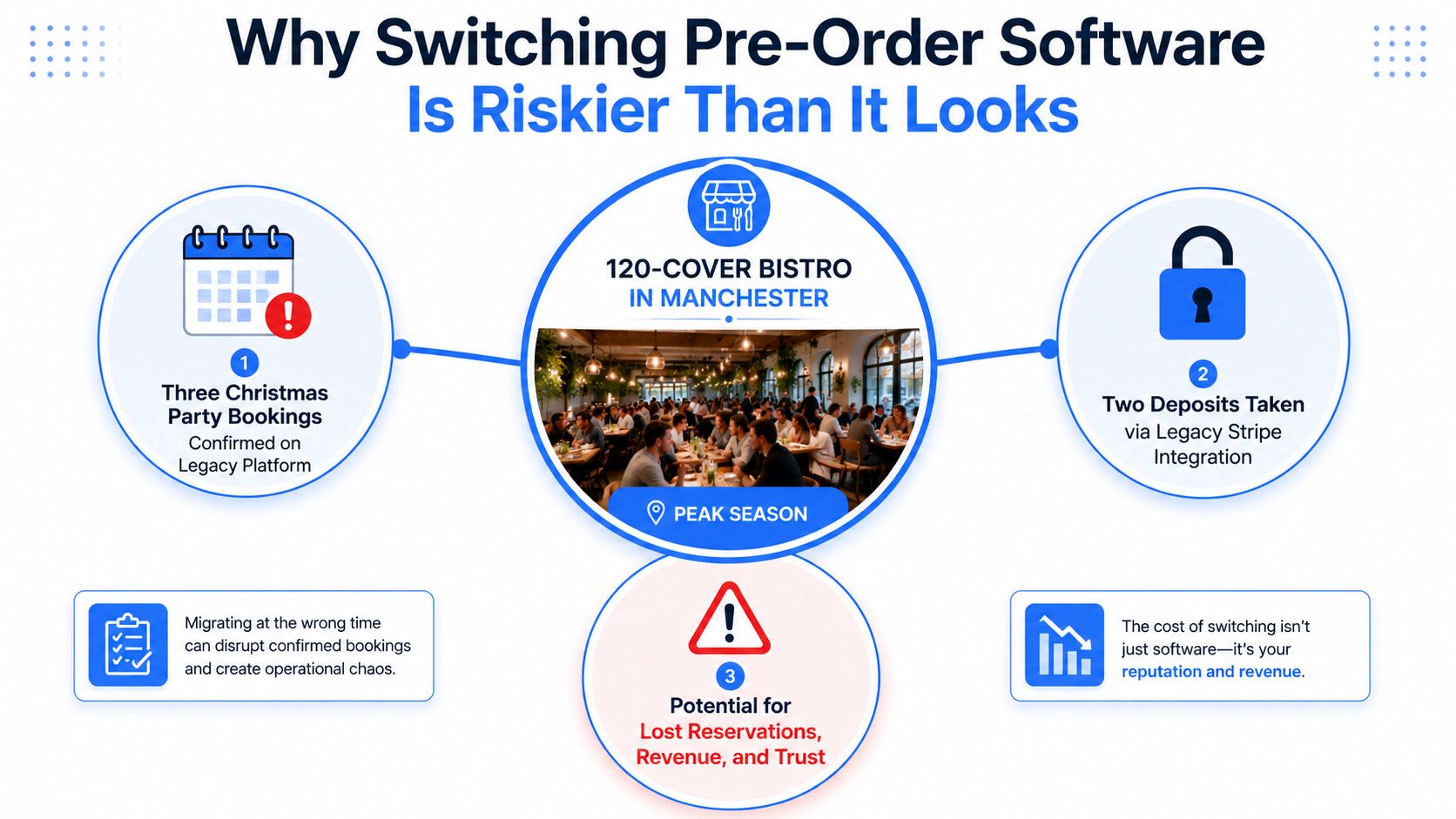
A 120-cover bistro in Manchester is approaching the Christmas rush. Three Christmas party bookings are confirmed on the old platform, two deposits were taken through its legacy Stripe connection, and every cover carries dietary notes. The replacement system has been configured, but the public booking form still points to the old diary.
That scenario contains three separate risks. A booking can be missed during export, a deposit can remain attached only to the old transaction record, and a dietary note can disappear from the operational view used by the kitchen. A venue might still have a clean-looking customer spreadsheet while losing the information that makes each reservation usable.
The guest journey is the system
UK hospitality demand is already heavily digital. Direct digital channels were forecast to grow at a 7.34% CAGR through 2031, while online booking platforms remained dominant in UK event ticketing and hospitality discovery, according to UK hospitality market analysis. The same source cited a 94.6% contactless transaction rate in 2024, which reinforces how accustomed guests are to low-friction digital journeys.
That makes continuity more important than a perfectly tidy back-office migration. Booking forms, confirmation emails, reminders, deposits, and payment journeys must keep working while records move. If a guest clicks a link and receives an error, or pays without receiving a usable confirmation, the venue owns the resulting confusion.
UK booking behaviour also makes the commercial risk tangible. One hospitality study found that 56% of diners preferred to book through a restaurant website, while 28% preferred an online booking system or app. The same research reported that one in every 20 confirmed bookings between January and February 2023 became a no-show, with restaurants losing an average of £1,325 during that period. Those figures are documented in UK hospitality booking trend research.
Practical rule: A booking isn't migrated until the guest, the money, the operational notes, and the confirmation path all point to the same usable record.
Auditing Your Current Bookings and Workflows Before the Switch
Start with an audit, not an export. Exporting too early can preserve the wrong statuses, omit information stored in custom fields, and give the team false confidence because the file opens successfully.
The audit should produce a controlled inventory of every live event and every process connected to it. Keep the original source files untouched, record who extracted each report, and assign an owner to resolve exceptions before the new system is opened to the public.
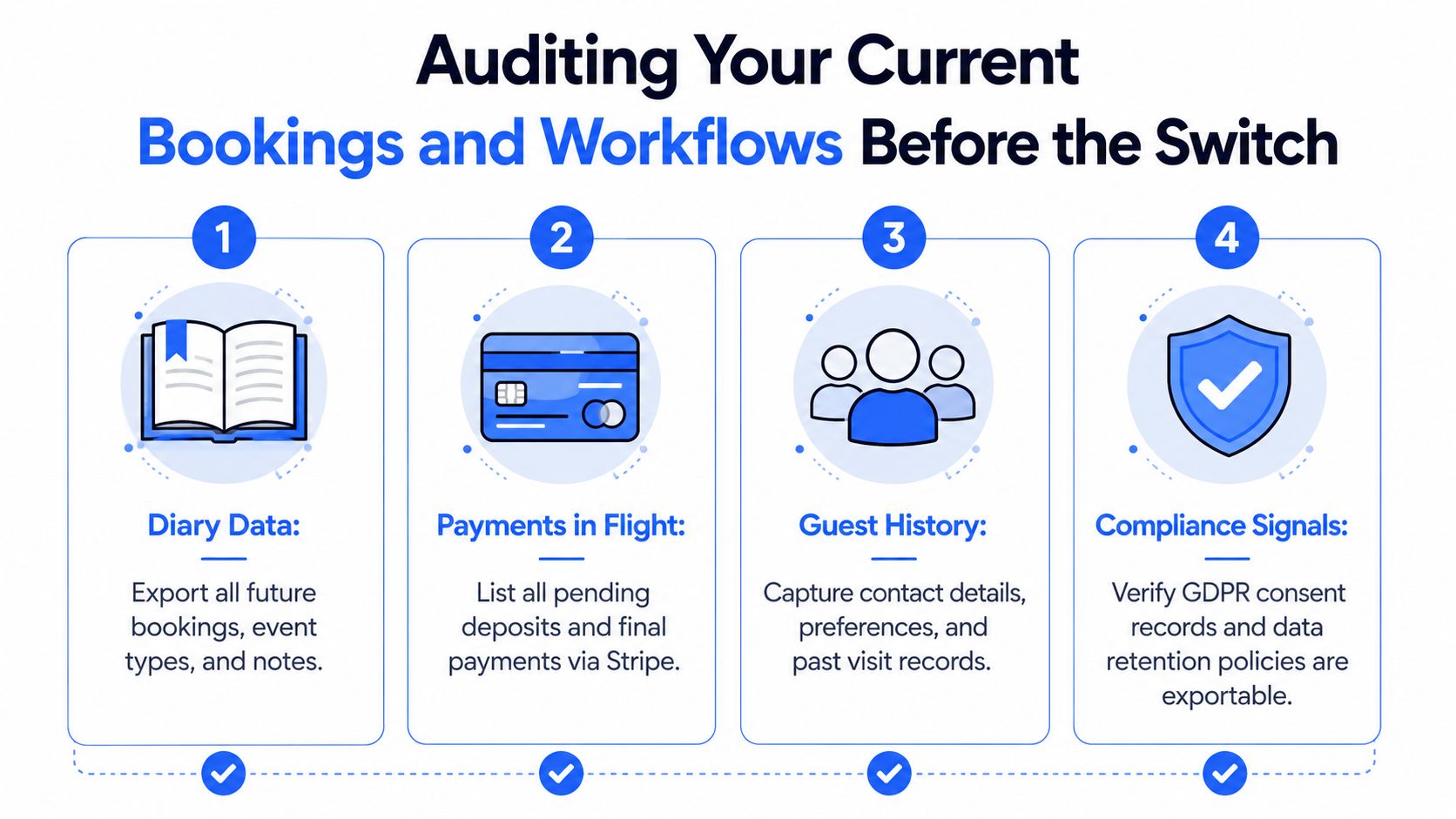
Four audit buckets
Diary data comes first. Capture future reservations, event dates, arrival times, party sizes, room or table allocations, event types, booking statuses, internal notes, guest-facing notes, and every booking reference. Include tentative bookings, held dates, waiting-list entries, cancelled records that still have financial implications, and telephone reservations entered manually.
Payments in flight need their own register rather than a note inside the booking export. List deposits, instalments, refunds, chargebacks, pending authorisations, payment dates, settlement dates, payment references, and the remaining balance. A booking can be present in both systems while its payment state is wrong, so finance should own this reconciliation.
Guest history includes names, organisation details, email addresses, phone numbers, visit history, preferences, dietary requirements, allergen information, and contact permissions. Separate the person arranging a corporate event from the individual diners attending it. Preserve the relationship between the booker, event, and each guest rather than flattening everything into one customer row.
Integration touchpoints include booking widgets, payment gateways, ticket links, QR codes, voucher processes, loyalty applications, point-of-sale connections, accounting exports, email automations, and staff calendars. For each connection, record its owner, purpose, credentials held by the venue, failure behaviour, and replacement date.
The compliance check
UK GDPR records shouldn't be treated as optional customer metadata. Verify that marketing consent, communication preferences, retention rules, suppression records, and completed right-to-be-forgotten requests can be exported or recreated accurately. Don't import a deleted contact because the old file is easier to use than the current suppression record.
Use the audit to classify fields:
- Must preserve: booking reference, event date, status, guest identity, party size, payment state, balance, dietary and allergen details, consent status, and operational notes.
- Rebuild carefully: seating layouts, menu selections, ticket types, automated messages, and staff assignments.
- Nice to have: redundant display labels, obsolete campaign tags, and old internal comments with no operational value.
The quiet failures are usually outside the main diary. Ask managers to check notebooks, inboxes, spreadsheets, shared calendars, and staff-held telephone bookings. A reservation that exists only in a supervisor's email is still a live booking, and it needs a controlled record before the public switch.
Mapping and Exporting Diary, Deposits, and Guest Data
A clean export starts with a field map. Don't ask the new platform to “take everything” without defining how each field should behave after import. The same value can mean different things in different systems, especially where one system stores a deposit inside a booking and another treats it as a ledger transaction.
Create a mapping sheet that names the original field, the destination field, the transformation, the validation owner, and the consequence of an error. Include custom fields for allergens, dietary requirements, occasion tags, pre-order menus, seating preferences, invoice references, and event-specific instructions.
Field mapping example for pre-order data export
| Legacy field | New platform field | Transformation required | Risk if mishandled |
|---|---|---|---|
| ReservationID | Booking reference | Preserve the original value and mark it as immutable | Staff can't match guest queries or payment records |
| PartySize | Guest count | Convert to a numeric field and compare with seating capacity | Kitchen quantities and table plans become unreliable |
| SeatingTime | Event or seating time | Standardise time format and confirm the venue's timezone | Guests arrive against the wrong service window |
| GuestName | Primary booker | Split personal and organisation names where available | Duplicate profiles and unclear responsibility |
| DietaryNotes | Per-guest dietary or allergen field | Separate general preferences from allergy alerts | Critical information may not reach the kitchen |
| MenuSelection | Pre-order item or menu field | Match legacy labels to the new menu catalogue | Guests receive the wrong meal or staff can't prep |
| DepositAmount | Payment ledger entry | Export separately with payment reference and status | Deposit appears unpaid or can't be reconciled |
| ConsentStatus | Marketing permission | Map only current, auditable consent states | Unwanted messages or missing permissions |
| InternalNotes | Internal event notes | Remove obsolete comments and retain operational instructions | Staff act on inaccurate or hidden information |
Export money separately
Deposits and partial payments deserve a separate ledger export. Include the booking reference, transaction reference, amount, currency, payment date, settlement date, refund state, gateway, and balance after payment. Never rely on a total field alone, because a total doesn't tell finance whether the amount was captured, authorised, refunded, or manually recorded.
Clean the data before import. De-duplicate profiles, standardise phone numbers, separate corporate bookers from diners, and preserve the original booking reference even when a new internal ID is generated. Keep a frozen copy of the untouched export so later corrections don't overwrite the evidence used for reconciliation.
Before choosing a cutover date, compare:
- Total future bookings by status.
- Total guest or cover records.
- Deposit and payment totals by settlement state.
- Number of records with dietary or allergen information.
- Number of bookings containing custom event notes.
- Presence of every original booking reference in the destination.
A migration checklist from UK software switching guidance recommends freezing the final export, preserving untouched source data, reconciling record counts and values, and verifying the first live booking. Those controls aren't theatre. They give operations and finance a defensible way to identify what changed.
Handling Payments, Tickets, and Integrations During the Move
A booking can look correct in the new diary while its deposit remains tied to the old payment connection. Tickets introduce a separate guest-continuity risk. Importing the same guest list twice may issue duplicate tickets, while an incomplete transfer can make a valid ticket appear unused at the door.
Treat the move as a live service change, not a data-import exercise. Keep one booking record authoritative, preserve lookup access to the old system, and test each guest-facing and operational state before staff rely on it.
Payment and integration behaviour during migration
Payment reconciliation depends on references, settlement states, and ownership. Match booking references with transaction references, then confirm whether each amount was captured, refunded, pending, or recorded manually. A matching headline total does not prove that individual bookings are financially correct.
Ticket records need their own transfer rule. Decide whether existing ticket identifiers remain valid, whether the new system will issue replacements, and how staff will recognise a transferred booking at check-in. Test a paid booking, an unpaid booking, a changed headcount, a refunded deposit, and a cancelled event. Include a booking with a dietary or allergen update so the guest record and operational output remain aligned.
Pause non-essential automations during the overlap. Marketing messages, surveys, duplicate calendar updates, and low-priority exports can create conflicting instructions or obscure a real failure. Keep the old payment path available until the replacement diary has been imported and tested, unless the payment provider requires a different controlled sequence.
Check every connection that affects continuity: payment gateways, ticket scanning, email confirmations, kitchen or production sheets, finance exports, property management systems, restaurant reservation platforms, and reporting feeds. For each one, record its owner, trigger, expected result, and rollback action. Test webhooks and scheduled exports with a controlled booking rather than relying on a successful login.
A venue assessing Creventa event management platform should map its existing pre-orders, guest fields, seating rules, payment states, and reporting outputs before importing live records. The useful test is whether those records remain traceable through the new workflow, not whether the feature list looks complete.
Run a controlled overlap
Use read-only access to the old system wherever possible. New reservations should enter one designated source of truth, while the old diary remains available for reference. During the parallel run, compare the confirmation, ticket or guest status, kitchen output, payment record, and finance reference created by the same test booking.
Stop the cutover if any state is ambiguous. Staff workarounds create guest-facing errors and make later reconciliation harder. Record the failed case, correct the mapping or integration, and repeat the test before releasing the new flow.
Communicating With Guests and Timing the Public Switch
Guests don't need a technical explanation. They need to know that their booking remains confirmed, what sender address to expect, where to view or update their pre-order, and which contact route to use if something looks wrong.
Send a short message before the public switch only if the guest-facing experience will visibly change. Include the event date, booking reference, confirmation status, any action required, the new sender name or domain, and a direct contact route. Don't ask guests to rebook unless the venue has deliberately cancelled and recreated the reservation under a controlled process.
A practical communication timeline
T-14 days: Brief front-of-house, reservations, finance, kitchen, and event managers. Give staff the cutover date, escalation owner, approved wording, and a list of bookings with unusual payment or dietary conditions.
T-7 days: Test the new confirmation and reminder messages on desktop and mobile. Check branding, reply addresses, payment wording, accessibility, booking references, and links to guest forms.
T-3 days: Send any necessary guest notice. Use the existing trusted channel first, then make the new sender recognisable in the message. If email volume is changing, review guidance on smtp warmup so a new sending pattern doesn't undermine delivery.
T-1 day: Place a staff test booking, confirm its payment behaviour, and cancel it correctly. Put a notice beside the reservations phone and brief anyone handling walk-ins.
Cutover day: Switch the public booking widget, QR codes, landing pages, and confirmation links only after the imported diary and test booking pass validation. Keep the old public path available internally, not as a competing route for guests.
Avoid a Saturday, race day, festival, or any service where the reservations team can't investigate exceptions. Timing protects confidence more effectively than polished wording because the team needs capacity to answer questions and correct errors.
Give phone staff a simple script: “Your booking is still held under the same reference. We're checking the event record and will confirm the payment and menu details before changing anything.” That prevents well-meaning staff from creating a duplicate reservation.
Cutover Day, Parallel Runs, and Rollback Plans
Cutover day should feel controlled and slightly boring. If the team is improvising, the plan hasn't assigned enough ownership.
A low-risk sequence keeps the old diary available while the new system is configured, imports future bookings first, runs a test booking, and changes the public link only after validation. That sequence is also reflected in UK booking platform switching guidance, which stresses checking services, staff, customers, and opening hours before repointing public links.
The cutover diary
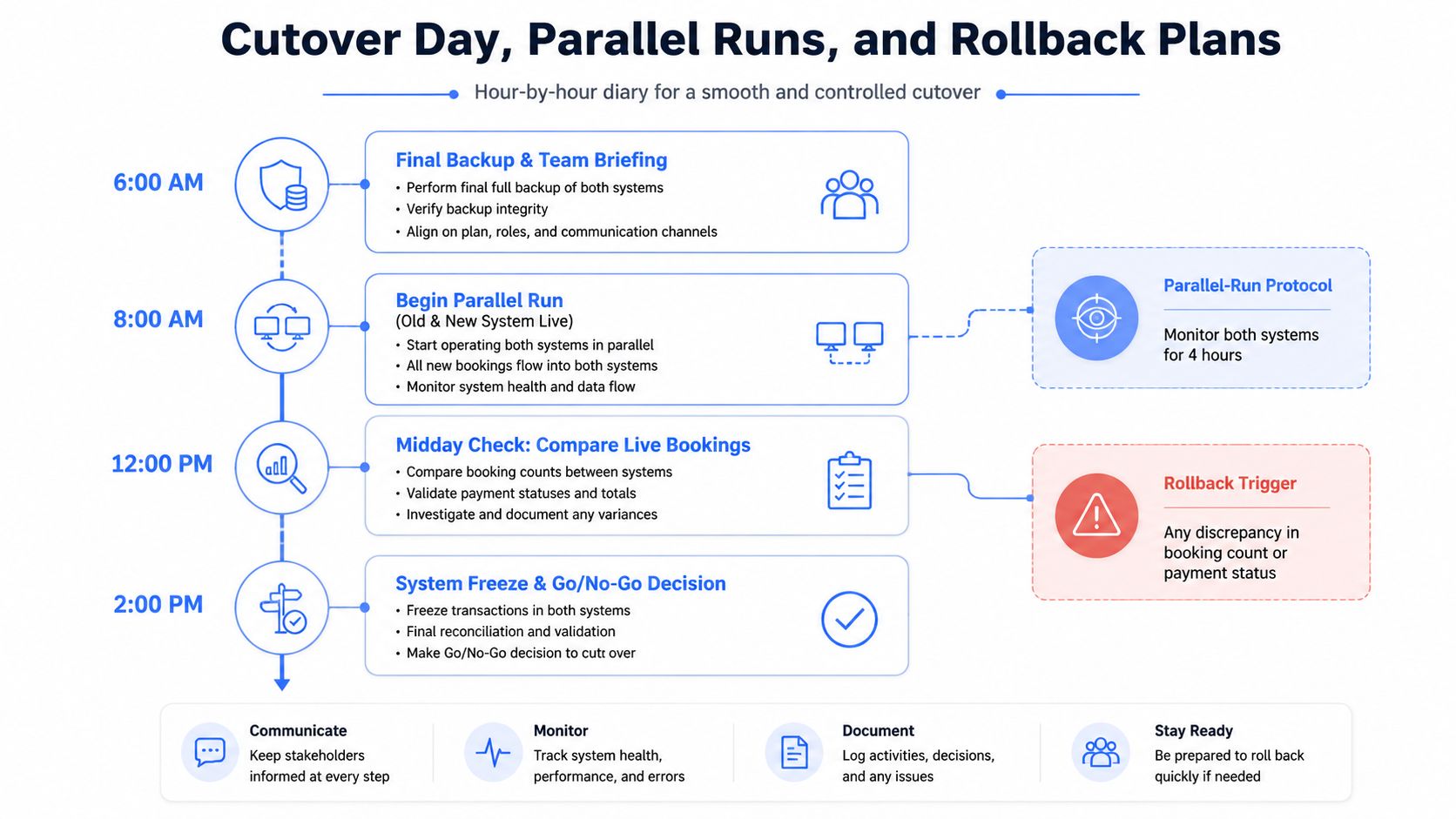
Before 6 am: Freeze non-essential edits. The operations lead confirms that staff know where to record urgent changes during the freeze.
6 am: Create the final backup and brief the team. Finance holds the payment ledger, operations holds the booking count, and the event lead owns guest communications.
8 am: Start the controlled parallel run. The new system receives the approved live workflow, while the old system remains available for read-only lookup.
Midday: Compare live booking counts, payment states, guest responses, menu selections, and dietary flags. Investigate every discrepancy instead of accepting a rounded total.
Before service: Reconcile the day's deposits and confirm that the public widget, confirmation email, reminder path, and staff lookup process all work.
2 pm: Make the go or no-go decision. If the checks pass, keep new bookings on the replacement system. If not, revert before the busy service begins.
A parallel run should have a defined end, but it shouldn't be an arbitrary deadline. UK migration guidance recommends keeping the legacy system as a read-only fallback, completing a final delta export for in-flight reservations, and avoiding decommissioning until at least one full busy service has completed cleanly. It also recommends testing deposits, holds, and messaging on desktop and mobile, as described in UK restaurant migration advice.
Rollback decision tree
- Booking count differs: Freeze new changes, identify the missing reference, and keep the old public route active.
- Payment status differs: Stop payment collection on the replacement route and ask finance to reconcile the transaction before proceeding.
- Widget is unavailable: Restore the previous public link and display the approved contact route.
- Dietary or allergen data is missing: Do not send the affected event to service as migrated. Use the source record and correct the destination.
- No discrepancy after validation: Continue with the new system and retain the old system as read-only fallback.
If rollback is required, staff should say: “Your booking remains reserved under the original reference. We're completing a system check and won't ask you to book again. We'll contact you directly if any action is needed.” That wording protects the guest from duplicate action while the team restores a known-good path.
Post-Migration Checks and the First 30 Days
A successful cutover isn't defined by the import button completing. It means the venue can find every future booking, explain every payment, produce the correct operational documents, and respond to a guest without consulting several disconnected sources.
Start with a same-day comparison against the frozen legacy records. Reconcile diary totals, booking statuses, booking references, deposits, balances, refunds, guest contacts, pre-orders, seating assignments, and dietary information. Sample records from each event type, including a tentative booking, a paid booking, a booking with changes, a corporate event, and a record created by telephone.
Daily checks during the first week
The venue lead should review:
- Unmatched payments: Every deposit and balance needs a booking reference and a clear settlement state.
- Missing pre-orders: Look for confirmed guests without menu selections or guests whose selections failed to reach the kitchen view.
- Dietary flags: Check that allergen and dietary information appears in the staff reports used during service.
- Integration errors: Review failed messages, payment callbacks, calendar pushes, ticket events, and point-of-sale updates.
- Guest complaints: Treat repeated questions about confirmations, links, or payment status as evidence of a workflow problem.
These are operating signals, not vanity metrics. A quiet dashboard doesn't prove continuity if the team hasn't tested the records that matter.
The 30-day review
At the end of the first week, operations and finance should sign off the diary and payment reconciliation separately. During the rest of the month, review the same checks weekly, document unresolved exceptions, and record which manual workarounds were needed.
Keep a short residual-risk register. Note fields that required manual cleaning, integrations that still depend on legacy access, reports that changed format, and staff steps that caused confusion. That record turns the next seasonal migration into a repeatable operational process rather than a fresh emergency.
Food control belongs in the review as well. UK hospitality and food-service businesses produce about 920,000 tonnes of food waste each year, with around 75% described as avoidable, and guidance from WRAP on hospitality and food-service waste links pre-ordering and more accurate ordering with better demand matching. In England, hospitality businesses have been legally required since 2023 to separate food waste from general waste and arrange separate collection, according to British Business Bank sustainability guidance.
A 2024 article from a UK university hospitality expert also identifies deposits, waiting lists, and meal pre-selection as practical ways to improve demand visibility. So “no bookings lost” should include the downstream result, the right guest record, payment, menu choice, dietary detail, kitchen output, and finance trail all survive together.
Creventa brings event enquiries, proposals, quotes, deposits, guest pre-orders, allergens, seating, reports, and post-event feedback into one hospitality workflow, with Prinq supporting guest ordering and payment before the event. Visit Creventa to review the platform and plan a controlled switch around your venue's live bookings, integrations, and operational requirements.
James Nixon, Product, Creventa. James works on the Creventa platform, including guest pre-ordering, seating plans, ticketing and the reports venues rely on during service.